How to restore your database
The procedure described below will help you restoring the original database if something went wrong during the migration.
Copy database files
This procedure can only be used if a backup was done using the “Copy database files” method.
- Using the SSMS tool, detach the corrupted database:
 Show picture
 - Replace the .mdf and .ldf files with the previously saved files.
- Attach the restored database: Right-click on Databases → Attach... Show picture
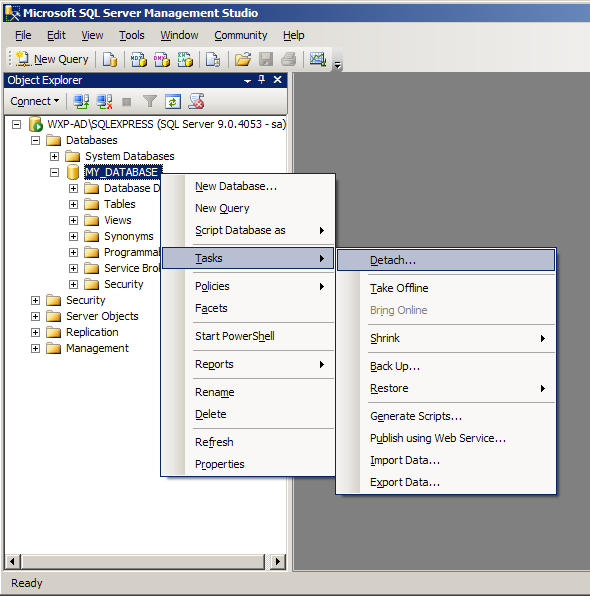
Right-click on the name of the database to be deleted and then Tasks → Detach...
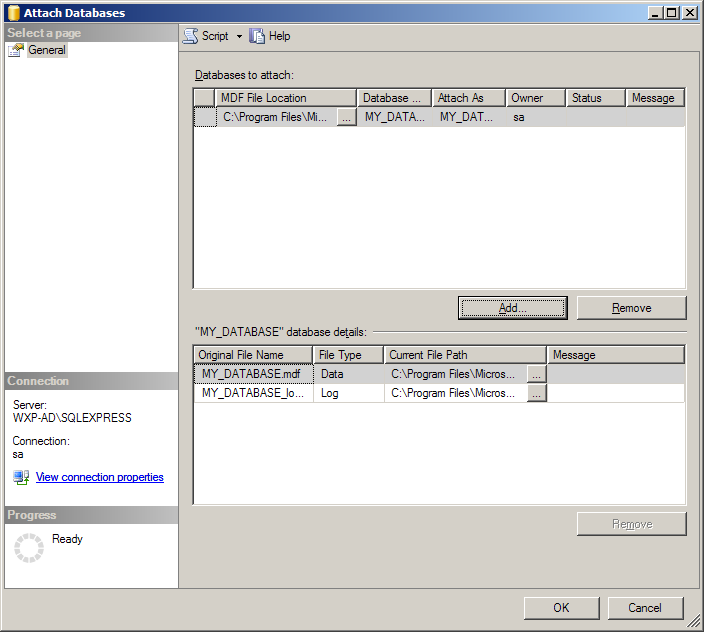
Click the Add button and select the .mdf files of the saved database.
Click the OK button.
SQL Server: Restore
A full restore can potentially interfere with regular backup that may be in place on your system.
Contact your database administrator before proceeding.