Networking Settings
The networking settings can be displayed from the Communication folder of the Application Explorer's Main Settings dialog or by using the Settings task when the Networking folder is selected in the Application Explorer's configuration tree.  Show picture
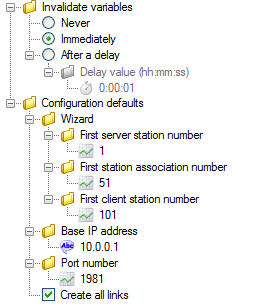
- Invalidate variables - The time in seconds after failure of communication
to another PcVue station before any associated variables become
invalid.
- Never - An infinite time-out, which can be useful for example, when using dial-up networking.
- Immediately - Invalidate variable immediately.
- Delay value - Invalidate variables after the given period.
- Configuration defaults - Defaults used when creating the network configuration either manually or using the wizard.
- Wizard - Networking wizard configuration defaults.
- First server station number - The first server station number to be used when generating the network configuration.
- First association number - The first association number to be used when generating the network configuration.
- First client station number - The first client station number to be used when generating the network configuration.
- Base IP address - The IP address pre-configured in the Node Configuration dialog. The default is 10.0.0.1.
- Port number - The Port Number pre-configured in the Node Configuration dialog. The default is 1981.
- Create all links - If ticked, automatically create all possible links between clients and servers. The default is ticked.
- Wizard - Networking wizard configuration defaults.