Managing Libraries in the Application Explorer
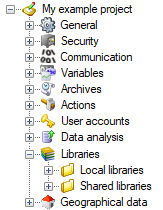
Tasks applicable to Libraries
When the Local Libraries folder is selected.
| Icon | Task | Description |

|
Add new local library | Add a new local library and create the corresponding folders. |
|
|
Add an existing local library | Add a local library to the project from folders that already exist. |
When the Shared Libraries folder is selected.
| Icon | Task | Description |
|
|
Add new shared library | Add a new shared library and create the corresponding folders. |
|
|
Add an existing shared library | Add a shared library to the project from folders that already exist. |
When a library is selected
| Icon | Task | Description |

|
Properties | Display the Library Properties dialog. |

|
Hide/show in selectors | Toggle display of the library in any of the dialogs where you can select a library. |

|
Remove | Remove a library from the project with the option to delete the supporting folders and their contents. |

|
Open the library with Windows Explorer | Open the folders forming the library with the Windows Explorer. |

|
Add an image | Add an image to the library. The image is copied from its current location to the library folder. |
Rules and behavior of cut, copy and paste
You cannot cut, copy or paste items within the Libraries folder.