Compatibility Settings
The compatibility settings are displayed from the Compatibility entry in the Application Explorer's Main settings dialog. The settings affect the compatibility of projects developed with earlier versions of the PcVue software.  Show picture
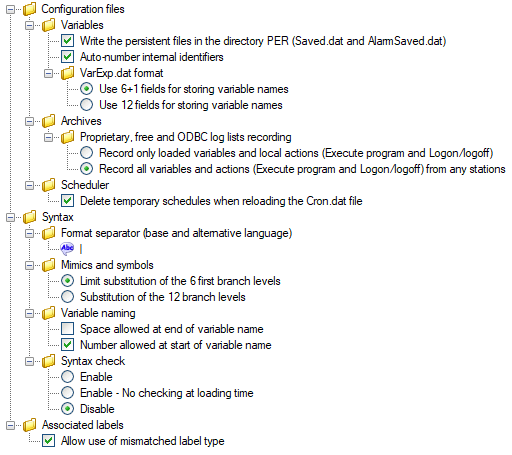
If you disable the syntax check in the edit fields, text that you then enter in those fields may cause erroneous operation of PcVue.
- Configuration files
- Variables
- Write the variables persistence files in the PER directory (saved.dat and alarmsaved.dat) - Store the persistence files in the PER directory instead of the C directory.
- Auto-number internal identifiers - If enabled, the tagnames associated to variables are numbered automatically at start-up. This setting must not be enabled if the project takes advantage of the legacy report feature.
- VAREXP.DAT format
- Use 6 + 1 fields for storing variable names - The six additional branches available from version 10 onwards are stored in a single (spare) field. The format is compatible to that of earlier versions of PcVue.
- Use 12 fields for storing variable names - The six additional branches available from version 10 onwards are stored in six new fields with all fields to the right of them shifted six places. The format is not compatible with that from earlier versions of PcVue.
- Archives
Proprietary, free and ODBC log lists recording
- Record only loaded variables and local actions (execute program and Logon/Logoff) - Allow you to control the behavior of log list recording in networked architecture. If selected, only those events having their origin on the local station (archive producer) are recorded.
- Record all variables and local actions (execute program and Logon/Logoff) from any stations - Allow you to control the behavior of log list recording in networked architecture. If selected, all events are recorded, those originating from the local station (archive producer) and also those coming from other stations.
- Scheduler
Delete temporary schedules when reloading the Cron.dat file – If enabled, all Cron items are deleted upon reload, even those created dynamically via a SCADA Basic script. Otherwise, only those coming from the configuration file being reloaded are deleted.
- Variables
- Syntax
- Format separator (first and second languages) - The character used to separate the format of the first and second language when used with text variables.
Mimics and symbols
- Limit substitution of the 6 first branch levels – Support for mimic & symbol branch substitution strings up to 6 branch segments only (#1 to #6, #B1 to #B6, #S1 to #S6…). Those greater than 6 are interpreted as plain text and not as substitution string.
- Substitution of the 12 branch levels - Support for mimic & symbol branch substitution strings up to 12 (#1 to #12, #B1 to #B12, #S1 to #S12…). Those between 7 and 12 are not interpreted as plain text but substituted.
- Variable naming
- Space allowed at end of variable name - Variable names are allowed to end with a space character.
- Number allowed at start of variable name - Variable names are allowed to start with a number.
- Syntax check
- Enable - If selected, the syntax check for variable names is enforced: Alphanumeric characters plus dollar ($), star (*), full stop (.), underscore (_), plus the character specified for the Domain and Nature separator accepted.
- Enable - No checking at loading time - If selected, the syntax check for variable names is enforced upon configuration change, but no verification is done at loading time.
- Disable - If selected, the syntax check for variable names is not enforced.
- Associated labels
- Allow use of mismatched label type - If enabled, it is possible to use alarm associated labels with Bit variables.