Managing User accounts in the Application Explorer
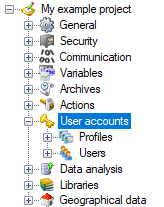
Some tasks and content pane elements are only available if the advanced strategy is enabled.
Tasks applicable to user accounts
When the User Accounts folder is selected.
| Icon | Task | Description |

|
Settings | Display the User accounts Settings dialog. |

|
Check Microsoft Windows® users | Display the dialog used to check the existence of a Windows user. |

|
Directory connection test | Display the dialog used to test connection to AD-DS, including existence of the domain, LDAP and LDAPS support. |
When the Profiles folder is selected.
| Icon | Task | Description |

|
Add a profile | Add a user profile. |
When a specific user profile is selected
| Icon | Task | Description |

|
Remove | Remove the selected profile. |

|
Properties | Display the properties of the selected profile. |

|
Associate a user | Associate a user with the selected profile. |
When the Users folder is selected
| Icon | Task | Description |
|
|
Add a user | Add a user. |
When a specific user is selected
| Icon | Task | Description |

|
Activate | Activate the selected user. |

|
Deactivate | Deactivate the selected user. |

|
Remove | Remove the selected user. |

|
Properties | Display the properties of the selected user. |
|
|
Associate a user profile | Associate a profile with the selected user. |
Information available from the Contents pane
When the Profiles folder is selected.
| Column | Description |
| Name | The name by which the profile is known. |
| Description | The profile description. |
| Profile level | The profile level. |
| Role | The profile's role. |
When the Users folder is selected.
| Column | Description |
| Account | The name by which the user account is known. |
| Display name | A combination of the user First name and Last name. |
| Description | The user description. |
| State | State of the user account. |
| Title | The user title. |
| Profiles | The name of any profiles associated with the user. |
| The user e-mail address. | |
| Mobile phone number | The user mobile phone number. |
Rules and behavior of cut, copy and paste
The following table describes the rules and behavior when using cut and paste, or copy and paste, on configuration objects in the User Accounts folder.
| User accounts | Behavior |
| Profile | The pasted Profile must be given a unique name. Any User that was associated with the original Profile will also be associated with the new one. |
| User | The pasted User must be given a unique name. If a Profile was associated with the original User, it will also be associated with the new one. |