Creating a specific service account to run PcVue
A service account is a Windows account used to start a Windows Service as in when PcVue is running as a service.
Options for selecting the Service Account
A service account is a Windows user identity that is associated with a Windows service executable for the purpose of providing a security context for that service.
Managed service accounts and virtual accounts are not supported by PcVue (sv32.exe) running as a service. Because of this, we will not include the use of managed service accounts and virtual accounts in this book.
When considering which account to use for a service there are two main choices.
- A built-in service account
- A local or domain user account
When choosing a Service Account to run PcVue (or any other service) the main criteria is to use an account with the least possible privileges. This is to ensure that the service is run as securely as possible.
According to Microsoft, Windows administrators should choose service accounts based upon the following hierarchy. This hierarchy is ordered from least privilege to greatest privilege:
- The Local Service built-in service account
- The Network Service built-in service account
- A Local or domain user account
- The Local System built-in service account
- Local Administrator account
- A Domain Administrator account
Options 5 and 6 represent “worst-case scenarios” in which a given service or application simply will not run with a service account containing lesser privilege and permissions. Option 4, based on the Local System account, cannot be used to run PcVue. For these reasons, only options 1 to 3 should be considered.
It is always preferable from a security perspective to run as your own service account that has precisely the permissions you need to do what a service does and nothing else. However, the cost of this approach is setting up your service account, and managing the password. It is a balancing act that each application needs to manage.
Using a Local Service account
Local Service is a limited service account that is very similar to Network Service and meant to run standard least-privileged services. However, unlike Network Service, it has no ability to access network resources that require Windows authentication. However, it can still access network resources that do not require Windows authentication such as a PLC using TCP/IP based communication. Therefore, if PcVue is not accessing anything on the network requiring authentication at the Windows level, you should seriously consider using the Local Service account.
Using a Network Service account
If PcVue requires authenticated network access, you might need to use the Network Service account or a local user account with minimal privileges.
Using a Local or Domain user account
If PcVue must interact with network services, access domain resources such as file shares or if it uses linked server connections to other computers running SQL Server for example, you might use a minimally privileged domain account. Many server-to-server activities can be performed only with a domain user account. This account should be pre-created by domain administration in your environment.
See About using a built-in Service Account and About using a User Account as a Service Account for more information related to selecting the Service Account for running PcVue as a Windows Service.
Creating a service account
The most common local Service accounts used are LOCAL SERVICE and NETWORK SERVICE but you can create a specific account that, for the purpose of this topic, we will call SV_SERVICE.
To create a local account you can open the Local Users and Groups console from the Windows Control Panel or directly from the SV Core Management Console (Tools.Local Users and Groups). For security reasons, the user account SV_SERVICE must belong to the Users group and never belong to the local Administrators group.  Show picture
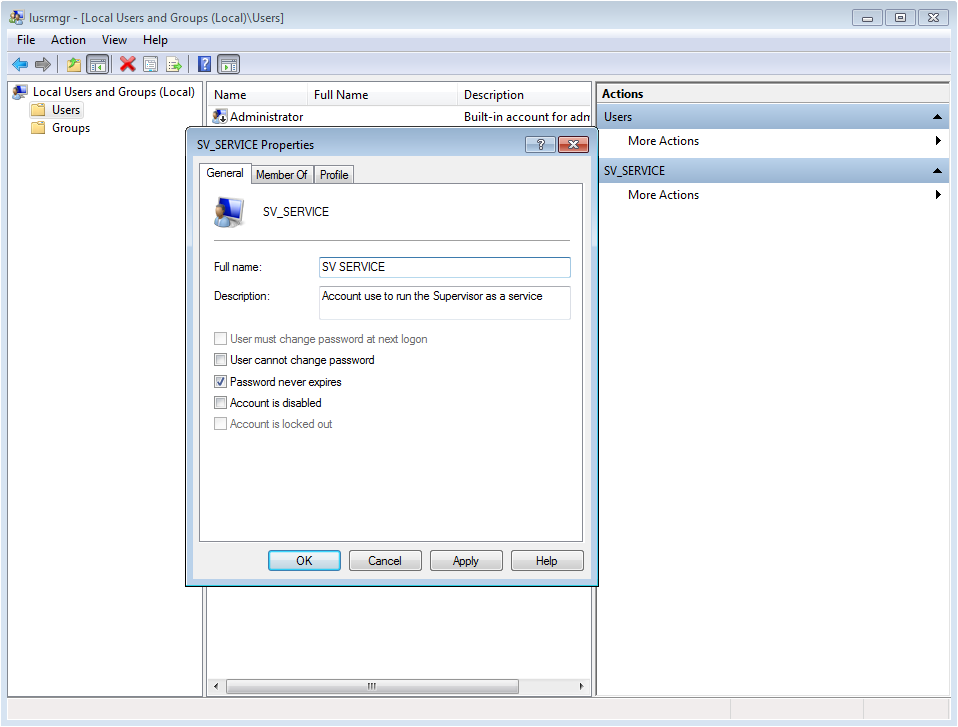
The basic security rule is to always execute a Windows Service with the least possible level of user rights.
If the architecture relies on an Active Directory domain, it can be useful and even necessary to create a domain user account.
Creating a user group
The purpose of this user group (SV_USERS for example) is to define the list of user accounts that are able to access the sv32.exe and HDS.exe processes when they are running as a Windows service or as a desktop application. Show picture
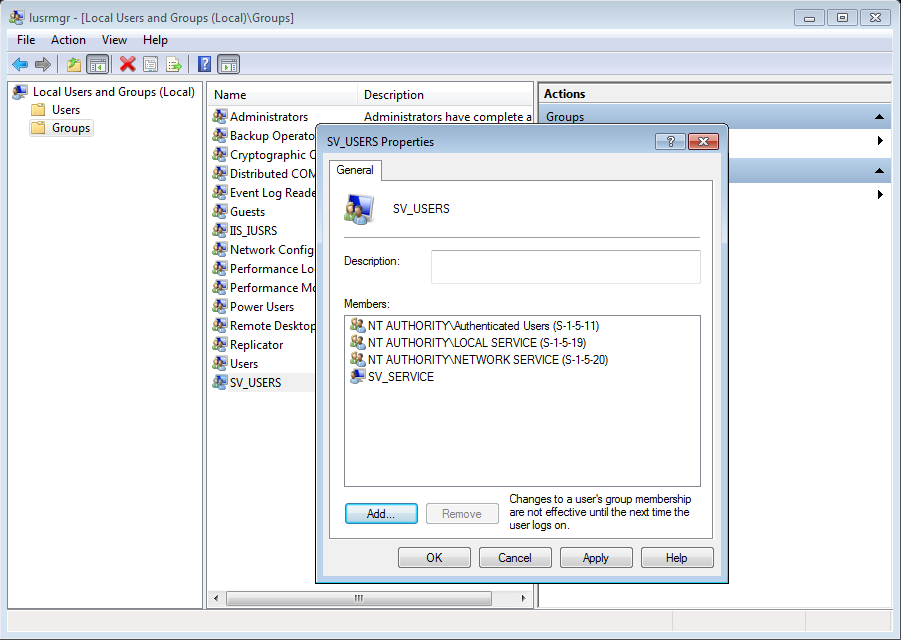
This group must contain:
- Interactive Users or Users Groups that are able to start PcVue tools such as the Application Explorer, the Application Architect or Smart Generators. Adding the Authenticated Users group is a simple way to accommodate any user logged on this computer.
- The Service account used to run PcVue as a service (LOCAL SERVICE, NETWORK SERVICE or SV_SERVICE for example).
Adding permissions to PcVue installation folder
The properties of the PcVue installation folder must be changed so that the user group has Modify permissions. Show picture
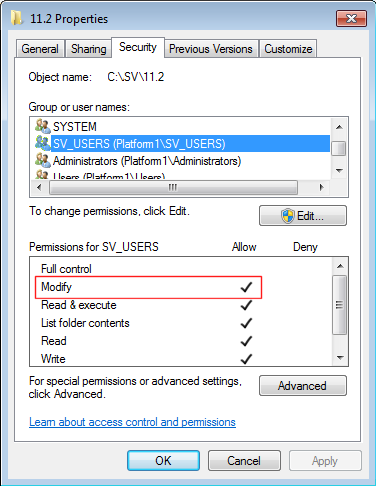
After a new users group has been created or modified, it is often necessary to restart Windows to have the changes taken into account.
DCOM settings
PcVue uses DCOM to communicate between its main process and its components such as the Application Explorer. DCOM is also used if the project configuration includes an OPC server, even if OPC clients are on the same computer. PcVue installation creates a DCOM entry called SV Services that is used to provide default security permissions for PcVue executables when running as a Windows service. It is necessary to adapt the DCOM configuration of the SV Services application to authorize the user group SV_USERS created above.
Windows DCOM configuration can be accessed from the Windows Control Panel or directly from the SV Core Management Console (Tools.Component Services). Using the Security tab of the SV Services properties, you must set the Launch and Activation Permission and Access Permission to Customize, add the user or user group (SV_USERS for example), and edit the permissions as follows. Show pictures
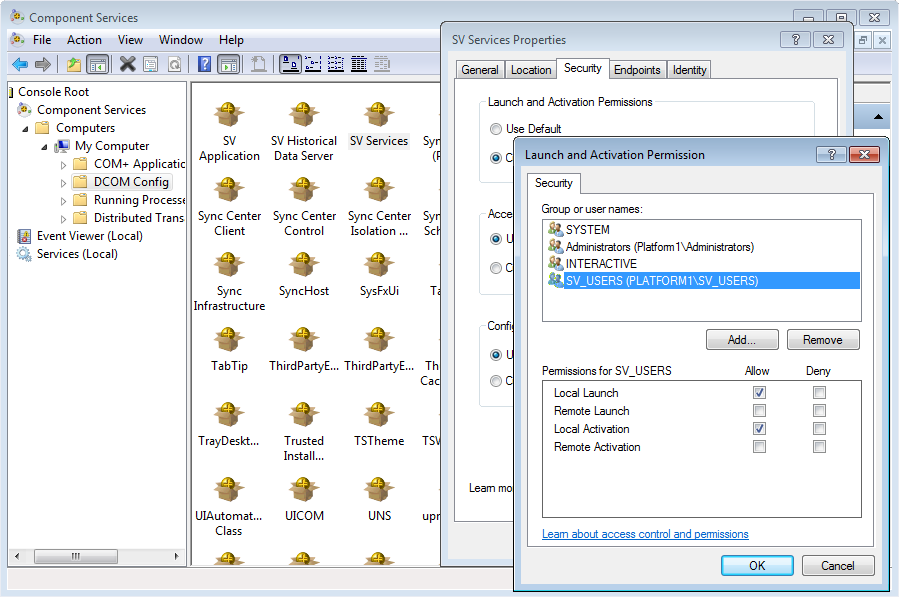
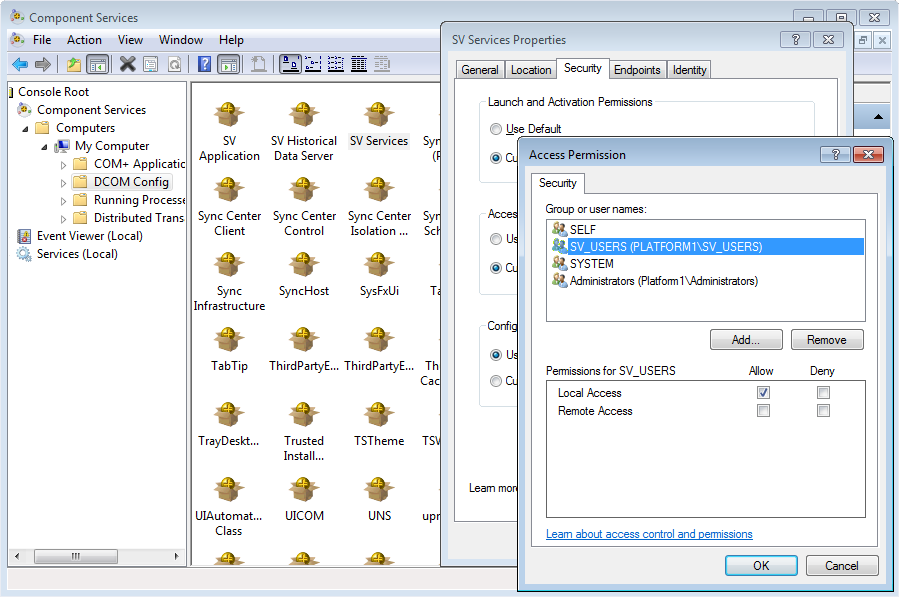
Remote Launch, Remote Activation and Remote Access permissions may also be required if PcVue is to be used as an OPC Server from a remote OPC client.
About using a built-in Service Account
The following table summarizes the major aspects of the built-in operating system identities that are used as default service accounts in Windows.
| Account Name | Actual name of the account | Visibility | Default Privilege Level |
| Local Service | NT AUTHORITY\LOCAL SERVICE | Local and Network (network access uses anonymous credentials) | Low (as authenticated user) |
| Network Service | NT AUTHORITY\NETWORK SERVICE | Network (uses computer account credentials) | Low (as authenticated user) |
| Local System | NT AUTHORITY\SYSTEM | Local and Network (network access uses computer account credentials) | High |
Some additional facts should be pointed out concerning the account identities.
You do not have to manage their passwords - Because these built-in identities are created by Windows itself, the operating system manages their account passwords. In this respect these accounts function like managed service accounts and virtual accounts.
The Local System account is very highly privileged - The Local System identity is granted system privileges that make this account in many ways more powerful than the built-in Administrator account. Although Local System was designed for access on a local computer only, this account can be associated with services that move across your network. In this case, the credential that is presented to remote processes is <DomainName>\<ComputerName>$.
The Local System account cannot be used to run PcVue.
Be wary of Local Service and Network Service account group membership - Again, the “Local” and “Network” parts of these account names inform us that the Local Service and Network Service accounts are targeted at local and network use, respectively.
However, you should always keep in mind that the Local Service account runs locally as a member of the computer’s Local Users group (Domain Users on domain controllers) and runs remotely as an anonymous connection.
By contrast, the Network Service account runs locally as a member of the localUsers or Domain Users groups, and runs remotely as a member of the Authenticated Users group. In addition, Network Service inherits any permissions that have been granted to the source computer account in Active Directory.
The fact that Local Service runs remotely as an anonymous connection means that any attempt to use Windows hosted network resources will probably fail. However, it does not mean a TCP/IP connection to a PLC would fail, as it does not normally require a Windows authentication.
In order to apply the principle of minimal privilege, the Local Service account is used in PcVue default configuration.
About using a User Account as a Service Account
You can sidestep some of the complexities of running services with the built-in service accounts by instead using a local or domain user account. An important point to keep in mind is that Windows automatically grants additional privileges (most notable the Log on as a Service and Log on as a Batch job privileges) to user accounts that you associate with services. Show picture
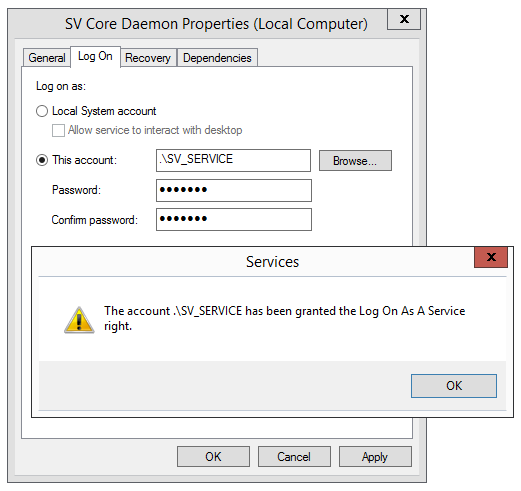
In addition, the SV Core Management Console grants two additional privileges to the user account associated with the SV Core Daemon service and the DCOM application.
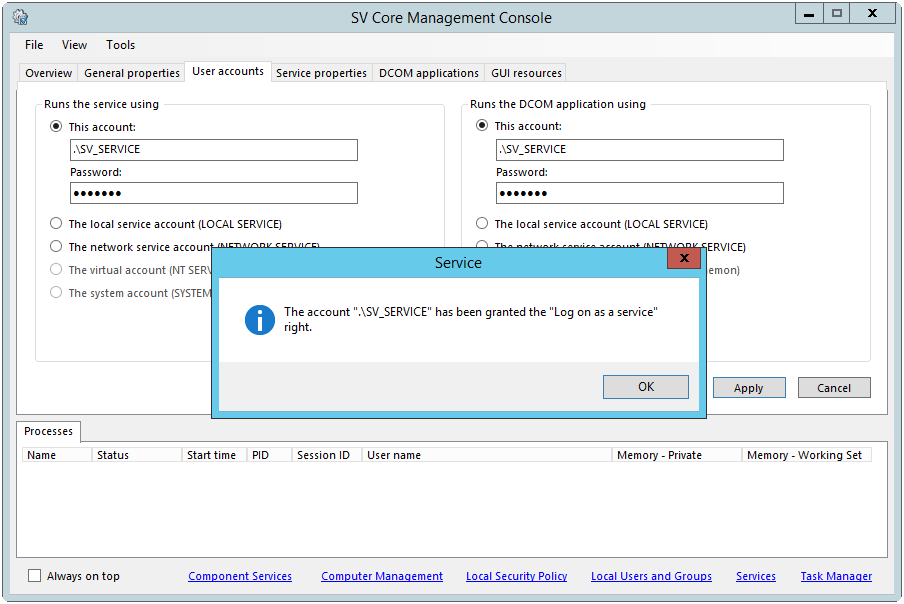
- Log on as a service - This security setting allows a security principal to log on as a service. Any service that runs under a separate user account must be assigned this right. Show picture
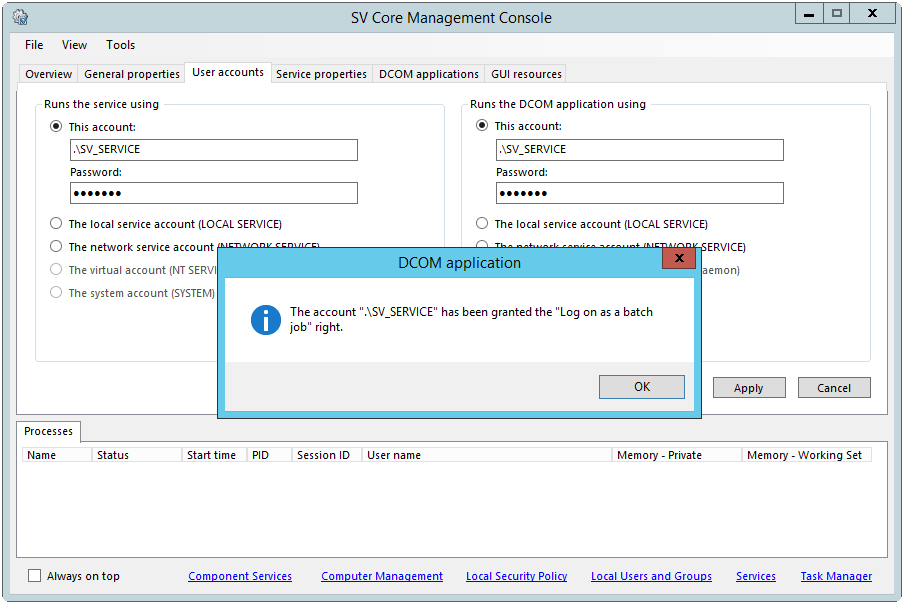
- Log on as a batch job - Any DCOM application that runs under a specific user account must be assigned this right. Show picture
For this reason, it is imperative that you never use a service account for interactive logon. In other words, a human being should never log on to a system by using a service account identity.