
When planning an industrial installation, the first thing that typically comes to mind is “PLC”. These boxes increasingly compact and powerful control the logic of almost any process, from elevators to nuclear power plants (although in the latter case we often speak more of DCS, a distributed control system designed for continuous processes in complex plants).
There are thousands of PLC types. Every manufacturer offers a range from small units with a few integrated I/Os to large, expandable models with thousands of remote I/Os and computing power rivaling that of a small server.
PLC programming or rather, PLC software development, as PLCs now support rich functionality and interact with non-OT systems is a crucial step to connect it to the supervising SCADA system.
Without a decent PLC software setup, starting the Real-Time Database mapping in SCADA (linking variables to PLC data) is nearly impossible.
In small plants, when handled by consultants or small panel builders, it’s common for the same person to develop both PLC and SCADA. The handover is simple. But with separate teams – or even separate companies – data structure exchange becomes a critical challenge.
In a PLC program, you typically distinguish:
- – I/O variables (if readable). SCADA should not directly read or command them; control logic must act as a buffer.
- – Internal memory areas. Best practice dictates that PLC developers define which variables are for SCADA (read/write) and which stay internal.
In theory, everything should work well… but in practice:
- – I/Os are added, removed, or moved.
- – Memory is adapted to improve performance or meet new needs.
And the SCADA mapping must follow. Back when I was programming on inverted barrels in faraway factories, we’d exchange messy Excel files on dusty USB sticks to track changes. That was the “good case”. Often, address changes were screamed over the roar of motors.
Thankfully, there’s good news.
The Smart Generator Concept
Many PLC development environments output the memory structure as machine-readable files often proprietary.
That’s why, over time, we developed a Smart Generator module in PcVue capable of parsing these files and importing configuration elements from various automation platforms (PLC programming tools, SCADA systems, even CAD environments).

The idea is to speed up the mapping process and reduce errors, especially where mistakes would be most costly. But not only that imagine the relief of not having to spend days copying Excel files full of numbers and letters, dots and brackets always at risk of mixing things up and (if you’re lucky) only realizing it on the day of commissioning, with the client watching.
How It Works
Here’s an important concept to clarify:
- – PLC data is grouped by origin (inputs, outputs, internal memory) and by type (digital, analog, etc.).
- – In contrast, data inside a modern SCADA Real-Time Database, like PcVue, is organized hierarchically to reflect the real structure of the plant.
The classic example we repeat endlessly in PcVue training courses (because it’s easy to understand) is that of a building with multiple floors, each with multiple rooms, each room with lighting and air conditioning control.
A hypothetical variable for setting the temperature setpoint might be named like this:
@BUILDING.FLOOR1.ROOM1.AC.SETPOINT
Now, it’s clear that linking a simple internal memory variable in a PLC to this SCADA setpoint variable would be difficult… unless here’s the magic: we make them talk the same language.
Smart Generator TwinCAT for PcVue
TwinCAT (by Beckhoff) is a PC-based control system that integrates PLC (IEC 61131-3) and motion control. It exposes variables via the ADS protocol (Automation Device Specification).
In TwinCAT, variables can be named mnemonically (e.g., “Setpoint of room one on floor one”), and are exposed in a structured, symbolic format which is far richer and more descriptive than what’s possible with older memory-area-based protocols like Modbus.
Here’s where it gets interesting with PcVue.
Instead of naming the PLC variables like a child’s school essay, what if we used the same naming convention as in PcVue? For example:
PLC1__BUILDING__FLOOR1__ROOM1__AC__SETPOINT
Then… PcVue can recognize that the ADS address of that TwinCAT variable should be linked to the corresponding PcVue variable. This naming convention allows the hierarchy in PcVue to be reflected directly inside the PLC code creating a kind of unified logic.
But wait there are a few differences to consider:
- – PcVue uses the dot (.) as a separator, not the double underscore __
- – PcVue variable names don’t start with “PLC1”
Luckily, Smart Generator includes an import wizard that makes it easy to strip out parts of the name and replace characters. So we can easily remove “PLC1” and replace __ with . — giving us the correctly formatted variable name in PcVue.
The result?
A fully mapped variable, with the correct address linked to the PLC.
Minimal effort involved.
Coexistence with Application Architect
So far, so good. But does using this method mean you lose all the benefits of object-oriented development with Application Architect?
Not at all… and that’s the beauty of it.
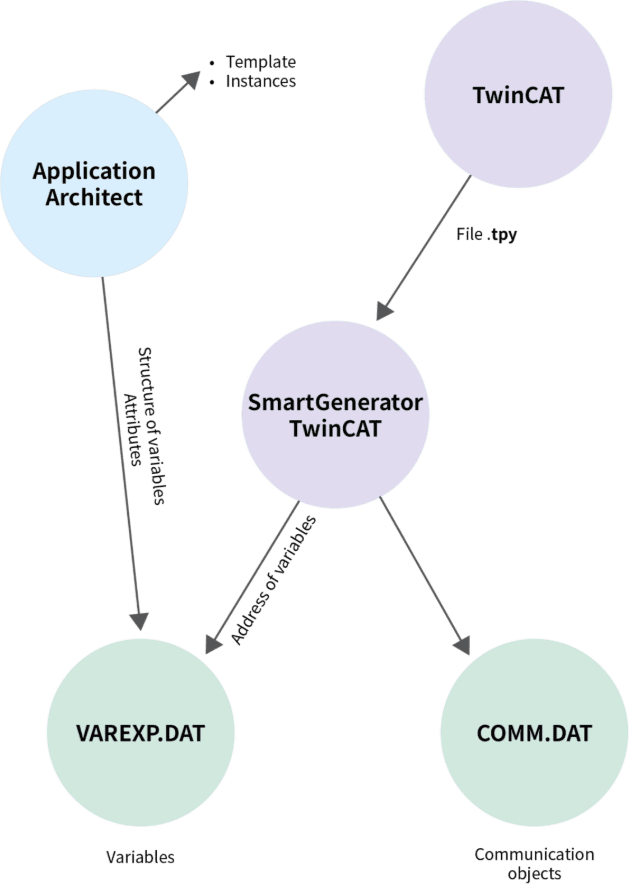
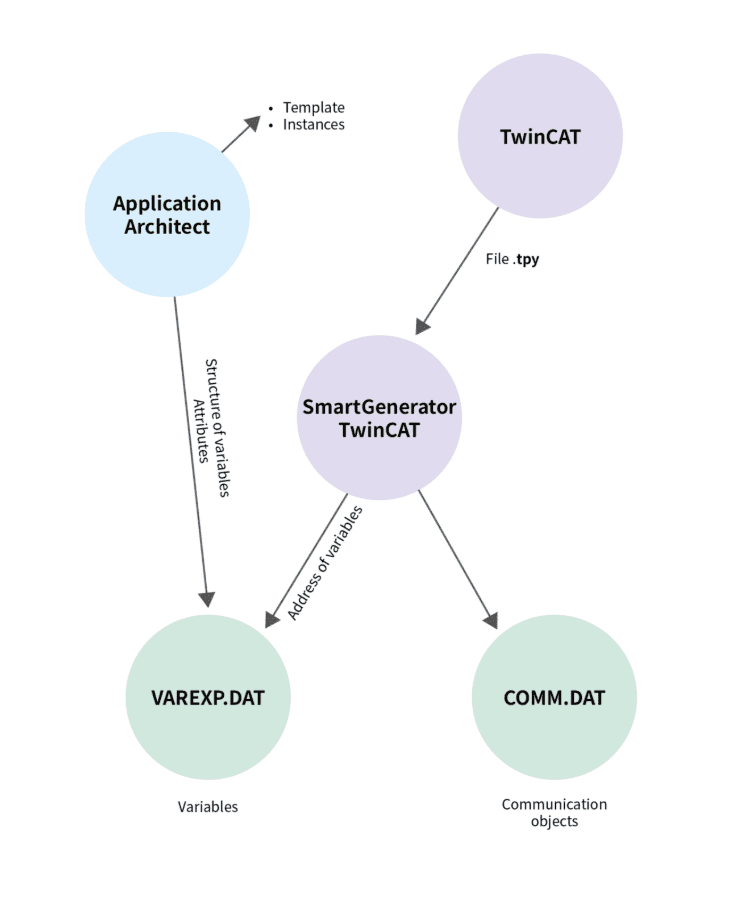
In Application Architect, you can continue to create and instantiate objects (e.g., air conditioning block, lighting block, room, floor, building, etc.). You define the variables as internal variables — and these are the same variables that will be populated by Smart Generator TwinCAT with the correct addresses.
The result?
- – Application Architect generates all the elements: alarms, trends, symbols, etc.
- – Smart Generator TwinCAT, run immediately afterward, applies the correct ADS address to each variable — maintaining all the previously configured properties.
And if the PLC is modified?
You just re-import using Smart Generator, and PcVue’s addressing is instantly realigned with TwinCAT.
And yes this works even with multiple TwinCAT PLCs in the same project.
Read more about Smart Generators and other PcVue features: PcVue Features – PcVue PcVue
| File name: | https://www.pcvue.com/wp-content/uploads/2025/09/PcVue-SCADA-Compliance-with-ISA-18.2-Alarm-Management-Standard.pdf |
| File size: | 1.47 MB |
| File type: | |
| Hits: | 1208 Hits |
| Downloads: | 44 Downloads |
| Created Date: | 13 Mar 2026 |
| Last Updated Date: | 13 Mar 2026 |
-
Tags Under
- Alarms
- ISA-18.2
- alarm management standard