Configuring Client-Server Archive Units
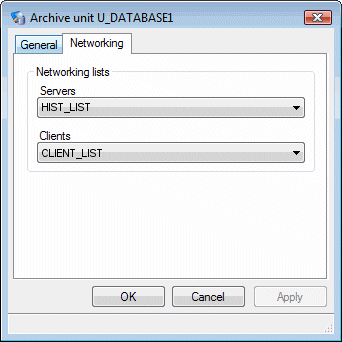
When configuring client-server archive units in a multi-station project, two station lists are selected as part of the archive unit configuration.
- A client list (containing the name of one or more stations)
- A historical server list (containing the name of a single station)
When the project runs on the station named in the historical server list, the archive unit is created and records data normally. Note that the station must be configured as a historic server in the project's network configuration.
When the project runs on a station named in the client list, the archive unit is not created and historic data is not recorded. Requests for historic data are redirected to, and processed by, the station named in the historical server list.
If you want to record and play back data on the same station, its name must be included in both the client and historical server lists.
How to configure a client-server archive unit
- Open the Application Explorer and configure an archive unit in the normal way. You can use client-server with either proprietary or database type archive units.
- In the archive unit
configuration dialog select the Networking
tab.
 Show picture
 - Select the Servers and the Clients networking lists. Note that the lists must have been previously configured as part of the network station configuration.
- Select the OK button to confirm the configuration and close the dialog.