Timestamping overview
By default, when a data source only provides values, variables' timestamps are set at the PcVue level, upon reception of a value change. Most of the Equipment drivers are for protocols that do not provide timestamp (nor quality).
With the cost of an ad hoc code library in the field device program that is beyond the scope of this documentation, some Equipment drivers in PcVue supports timestamping at the field device level.
Timestamping at the source is useful in systems where the correlation of I/O variables and alarms coming from different field devices is important, for example to store a proper Sequence Of Events (SOE) for operations' traceability or post-mortem analysis purpose. Because timestamping at the source usually require the handling of a data buffer at the device level, it can also be useful to avoid losing data due to short disconnections, by retrieving timestamped value changes upon reconnection.
In all cases, timestamping at the data source requires that all field devices and the computers hosting PcVue data acquisition servers have their clock synchronized by a common system-wide master clock.
The following drivers supports specific frame formats and behavior to handle timestamping at the source:
- Modbus Ip
- Siemens S7 Industrial Ethernet
- Siemens S7 Fetch/Write
- SAIA S-BUS
- GE Fanuc SRTP
- Modbus and Jbus
Refer to the driver reference topic for more information about the supported block structures.
Principles of operation
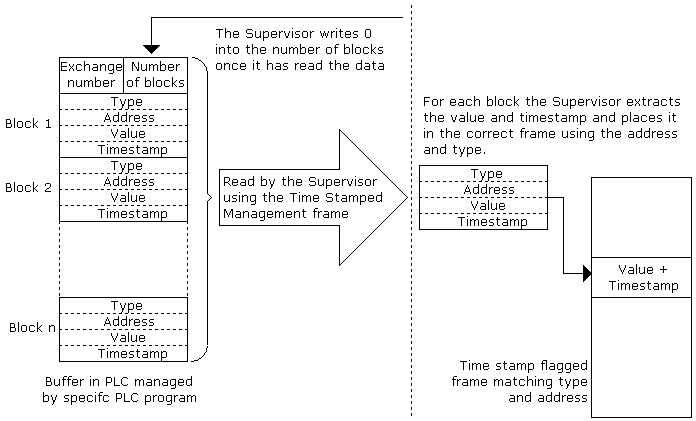
Configuration in PcVue
To use timestamped data the communication must be configured as follows.
- For each device supporting timestamped frames, the Enable source timestamping advanced property must be ticked and the error address must be configured.
 Show picture
 - Each frame to be used for timestamped data must have Refreshed using timestamp block property ticked. Show picture
These frames are known as timestamp enabled frames. - A single frame, with a timestamped address mnemonic, must be created for each device managing timestamped data. The Starting address property specifies the location of the first word of the timestamped data stack within the equipment data table. The Quantity property specifies the maximum number of timestamped blocks to be read. This frame is known as the Timestamped Management frame. Show picture
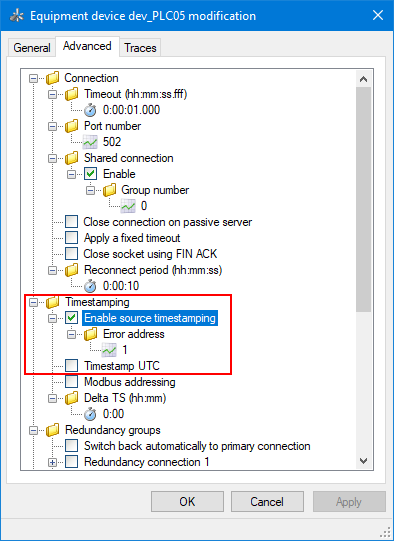
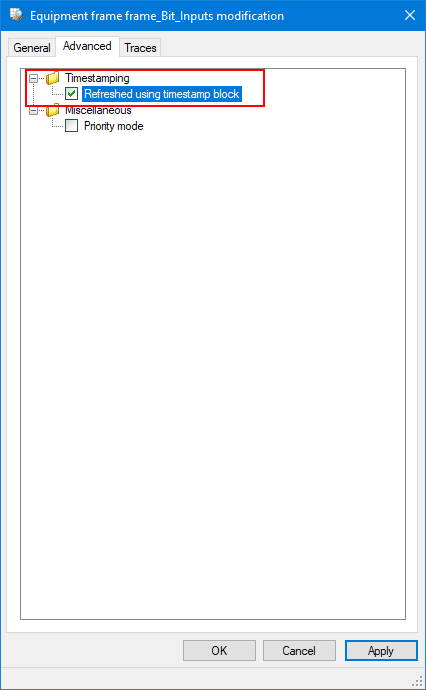
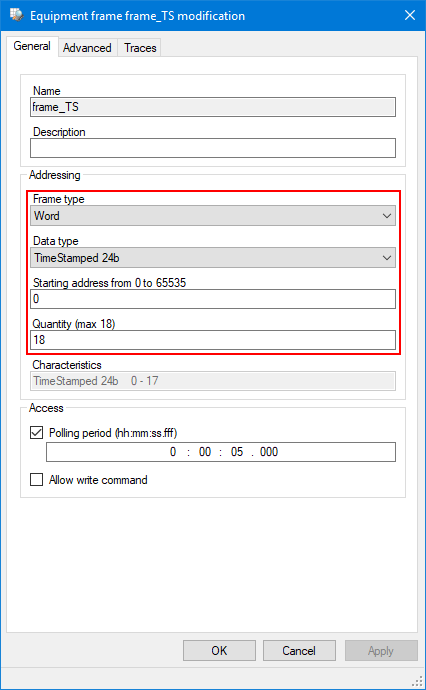
The Timestamped Management frame must be linked to at least one variable, or the driver will not activate it. The variable has no other use and will not have a real time value.
Program in the field device
The program in the field device must be modified to create and manage the timestamped data stack used for exchange of data with PcVue. The structure of the data stack must match that of the Timestamped Management frame.
The program in the field device must save the timestamped data in the stack and manage the exchange as explained below.
Operation of PcVue
The timestamp-enabled frames are not read cyclically from the field device. Instead, they are used by the Timestamped Management frame to match data table addresses with PcVue's variables.
The Timestamped Management frame polls the equipment regularly. The number of words read depends on the number of timestamped blocks and the type of timestamp. After each poll, a frame containing a single word is written back to the equipment, with the block number set to 0 and a copy of the exchange number, as a confirmation of the read.
Each poll of the Timestamped Management frame retrieves one or more values each with its own timestamp, type, and address. The type and address are matched with the configuration of the timestamp-enabled frames to select the variables that are updated with the value and timestamp.
Frames with the same type of data, that have the T-stamped property ticked, must not have overlapping address ranges as only the first frame will be refreshed with the value and timestamp.
Operation of the equipment
The program in the field device must place data in the data table that is being used as the timestamped data stack (according to the configuration of the Timestamped Management frame). The program must monitor the field representing the number of blocks and, when it is set to 0 (by PcVue), move the next block of data into the data table. Each time a new block of data is placed in the data table, the exchange number is incremented.
Error address
The error address allow the field device to manage communication if a problem occurs, for example if the storage buffer is full.
If the field device sets a timestamp block with the error address, as configured in the device configuration in PcVue, the driver will trigger a single shot read for all the timestamp-enabled frames configured for the field device. This allow the variables to be refreshed with the most recent values. Once the single shot is complete, the frames are no longer polled and the refresh using the timestamp mechanism resumes.
When one of the addresses in the Timestamped Management frame corresponds to the error address, the data field has no meaning.
Timestamped data handling with redundant servers
When using timestamped data and redundant data acquisition servers, you can either use one or two timestamped data stacks in the field device.
Single timestamped data stack configuration
With this configuration, only the active server acquires data from the timestamped data table in the field device. If the active server fails, it is essential to force synchronization of the data on the new active server. To do this, all the timestamped frames must be temporarily forced to use the normal polling mechanism. You can do this using the SCADA Basic instruction CIMWAY, mode SENDMSG.
CIMWAY("SENDMSG","MyNetwork","SwitchAllToPollingMode");
When all frames have been read once, the timestamp mechanism is automatically restarted.
Two timestamped data stacks configuration
Using two timestamped data stacks in the field device helps ensure that timestamped data is not lost during the switchover from one server to another.
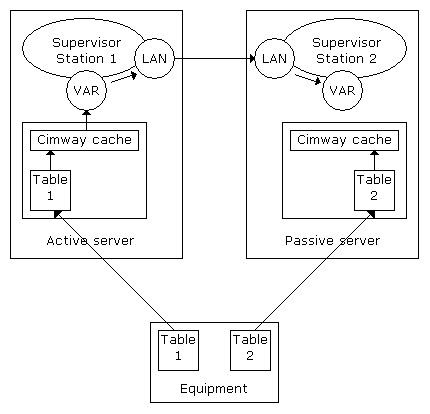
In this example, Station 1 is the active server. At startup, Station 1 initially polls all the frames to get the current values. Once this initialization phase is complete, the data exchanges revert to the timestamped method. The Communications Manager copies the variable values, and their timestamps, from its cache to the Variable Manager (VAR). The Variable Manager in Station 2 is also provided with these values via the PcVue networking.
Station 2 is the passive server. At startup, it behaves in the same way as the active server except that the values and timestamps in the cache of the Communication Manager are not copied to the Variable Manager. The same values and timestamps will be present in both stacks on the field device and hence will be the same in both Communication Manager caches.
Changeover from Station 1 to Station 2 as the active server takes place as follows.
Initially there is a switchover phase when:
- The two stations are no longer synchronized
- Each station updates its own Variable Manager
When Station 2 is fully active and Station 1 is passive:
- Both stations are visible on the local area network.
- Station 1 updates its Communication Manager cache exchanging data with the field device.
- Station 1's Variable Manager is updated from Station 2 via the PcVue networking.