How the station number and name is allocated to a host
Why is the station number and name important?
The station number (and name) is the identity of a station within a network system based on PcVue. It is the base to distribute roles within the client/server system, which station produces and which station consumes data acquisition flows, variables, archives...
The station number and name are also used in the construct of the names of the many system variables that provide status information about the station. For example SYSTEM.<StationName>.OK_NUMBER.
Automatic allocation
By default, the station number is allocated automatically based on the project configuration.
When PcVue starts, it looks up the project network configuration for either the computer host name or IP address (depending on which you have used in the project configuration). If the host name or IP address can be matched to that of a configured station, PcVue allocates the corresponding station number.
In the following picture, if PcVue finds that the host computer has the IP address 192.168.2.3 the station number is set to 3 and the station name to STATION3.  Show picture
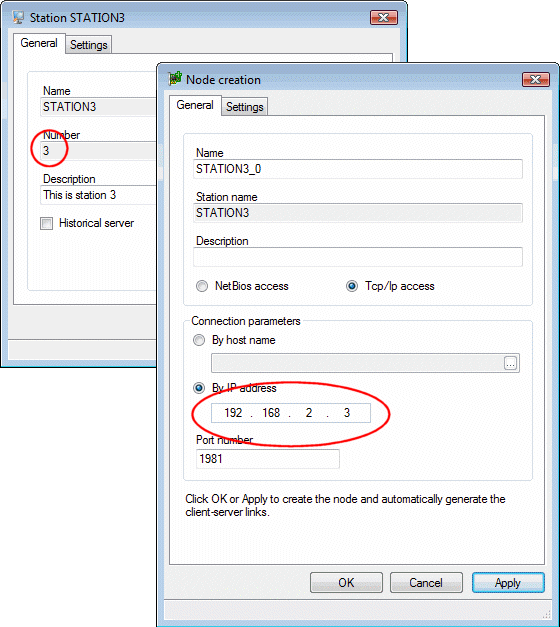
Allocation based on the fallback station number
If the host computer network interfaces cannot be looked up, PcVue takes the station number you have defined as the fallback on the host computer at the time of project deployment. This may occur when the network interface cards is deactivated or a network cable is unplugged for example.
The same goes if the look up for automatic allocation does not find a match because neither the host name nor the IP address of the host computer can be found in the configuration of any station in the project.
The fallback station number is set at deployment time with the Host Deployment Console or the svcmd CLI. For example, you will run the following command to set the fallback station number to 7 on a computer host where you intend to run your project:
svcmd host station-number 7 # Set the fall-back station numberThe allocation based on the fallback number is an important mechanism in case the automatic allocation cannot find a match at startup. For this reason, it is important that you set it properly on all PcVue host computers.
See the Host Deployment Console or the svcmd CLI reference for more information about how to change it.
On an RDS host computer, the fallback is only used for the allocation of a station number to the PcVue instance running on the RDS host session. It is ignored for instances running in remote desktop sessions.
Allocation using the -station_number switch
The station number can be also forced via a switch on the sv32.exe process.
This capability is only useful in specific cases when you want to bypass both the automatic allocation and the fallback mechanism, for example on an engineering station for the purpose of a specific one-time test.
If the command line used to start PcVue has the -station_number argument followed by a value, the value passed will be used as the station number. When defining the station number on the command line, the automatic allocation is bypassed and the fallback is ignored.
For example, the following command line allows you to select the project at startup and allocates the station number 99:
C:\Program Files\ARC Informatique\PcVue 17\
We recommend you to be extra careful when allocating the station number via the command line to avoid duplicated station numbers on the network. As for IP addresses, duplicated station numbers for stations running at the same time on a network lead to unexpected behaviors that can affect operation safety and security.
The -station_number switch is ignored if the host is protected.
This command line above is typical on a host used for test, you want to select the project and force the station number at startup. The project may or may not be protected, but the host is not. In production, there is no valid reason to force the station number.