IEC 60870-5-104 Server Settings
The IEC 60870-5-104 Server settings can be displayed by using the Settings task when the IEC 60870-5-104 Server node is selected in the Application Explorer's configuration tree.  Show picture
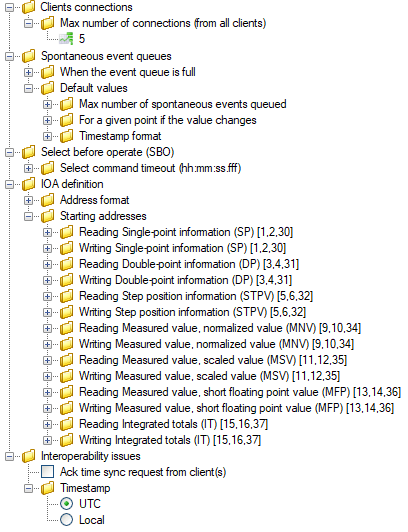
- Client connections
- Max number of connections - The maximum number of concurrent connections the IEC 60870-5-104 server will accept from clients. The default is five.
- Spontaneous event queue - The behavior of the queue in PcVue that is used to buffer spontaneous (unsolicited) events before they are sent to a client.
- When the event queue if full
- Delete the oldest
- Keep the oldest and ignore new events
- Default values - The following setting are used by default. They can be overridden by the properties of specific sectors or information objects.
- Max number of spontaneous events queued - The default is 100.
- For a given point if the value changes
- Buffer all changes
- Keep only the last value change
- Timestamp format
- No timestamp
- 24 bit format
- 54 bit format
- When the event queue if full
- Select Before Operate - Settings that affect the server behavior when receiving a select before operate command from a client.
- Select command timeout - The SBO command timeout. Default 5 seconds.
- IOA definition - Settings that affect the way in which the IO are addressed.
- Address format
- Unstructured
- Structured 3 bytes (MSB first)
- Starting addresses - The start address for each of the supported Information Object type.
- Address format
- Interoperability issues
- Ack time sync request from clients - If enabled, the IEC 104 outstation will acknowledge positively the reception of clock synchronization requests.
The clock synch should be based on a system-wide master clock. Because setting the Microsoft Windows system clock requires privileges higher than those usually given to the account used to run PcVue, the IEC 104 outstation never sets the system clock upon reception of such a clock synch command. - Timestamp
- UTC - If enabled, all timestamps send by the selected sector are expressed in UTC.
- Local - If enabled, all timestamps send by the selected sector are expressed in the Local time zone.
- Ack time sync request from clients - If enabled, the IEC 104 outstation will acknowledge positively the reception of clock synchronization requests.
While the IEC 104 standard assumes the use of timestamps expressed in the local time zone, many devices supports the use of either local or UTC timestamps. The Timestamp interop setting allows you to set how the IEC104outstation should interpret timestamps. This setting must be carefully set in accordance with the behavior of the installed devices.
In case of a discrepancy on this setting, and in addition to monitored data being wrongly timestamped, any received time-tagged command will be ignored if the timestamp is in the past compared to the current time. This occurs if there is a behavior discrepancy between the devices and the IEC 104 outstation and can be fixed by changing the Timestamp setting.