Managing security certificates
Security certificates in the Application Explorer helps you handle certificate that are used for secure exchanges of information between client and server stations, or between PcVue and external systems.
At the time of writing this topic, security certificates you reference on the Security node are only used for the OPC UA client driver, the DNP3 driver and Client/server networking.
Prerequisites
- You are logged in with a user having the Security administration permission enabled. See the topic Permissions related to operating system and development access for more information.
How to create a security certificate
- Go to Configure.Application Explorer and expand the Security node.
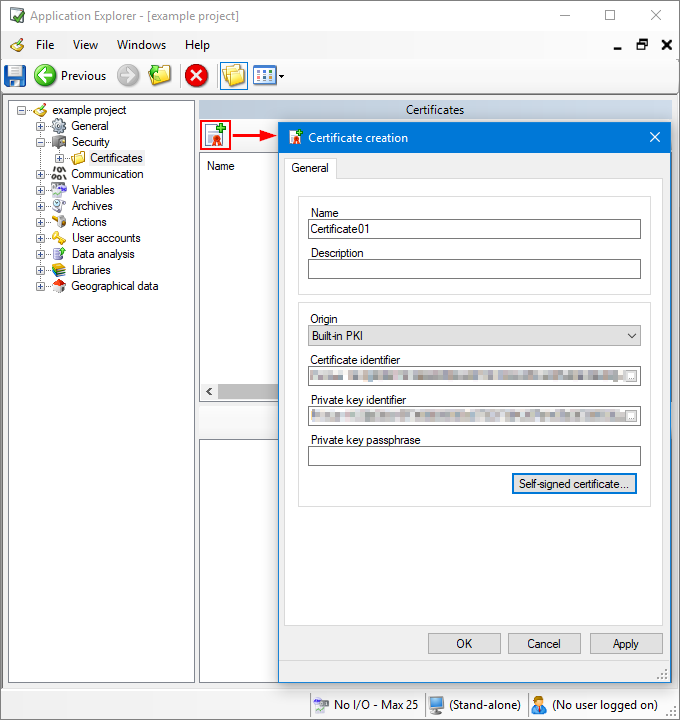
- Select the Certificates node, then click the Add a certificate icon from the task bar or the left pane. Once created, your security certificate appears on the right pane.
 Show picture
 - Enter a name for your certificate and a description (optional).
- Select from the Origin drop-down where your security certificate is stored and from where it will be retrieved, either the built-in PKI or the Windows store.
- (Windows store) Select the Registry location, either Current user of Local machine, the Find criteria and certificate identifier. Finally, enter the passphrase.
- (Built-in PKI) Select the Certificate identifier, the Private key identifier, and enter the passphrase.
- Alternatively, you can click the Self-signed certificate button to create a new one which will be stored in the built-in PKI.
- Click Ok to save the certificate and close the window.
You can export the certificate created using Show certificate details in the task pane.
You can import certificates into PcVue using the General tab.
Other tasks
Once a certificate is referenced in PcVue and selected in the Application Explorer, the following tasks are available:
- Remove - Remove the reference to the certificate from the PcVue configuration. If a certificate is removed, it can no longer be used as part of the configuration.
- Properties - Opens the Certificate dialog and displays its properties.
- Show certificate details - Opens a dialog showing details about the certificate including trustworthiness, attribute values, and certification path.