Features Specific to Register Variables
Configuring the display range
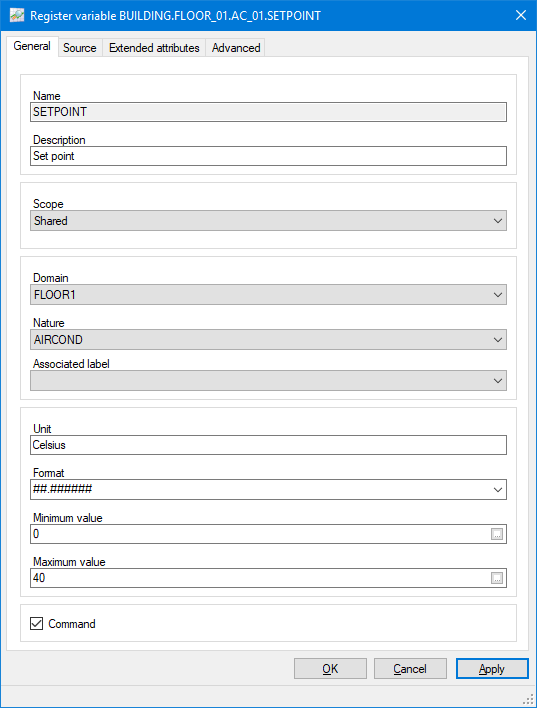
The range for a register variable is determined by the Maximum Value and Minimum Value properties in the General tab. The register range can be entered either directly as numbers or as the names of other register variables. If a variable name is entered, the value of the variable is used and the range can be changed dynamically at run-time. If entering a value directly, it can either be in decimal notation (for example 1.234) or for numbers greater than 1E+15 or less than -1E+15, in exponential notation (for example 3E+18).  Show picture
Configuring the command range
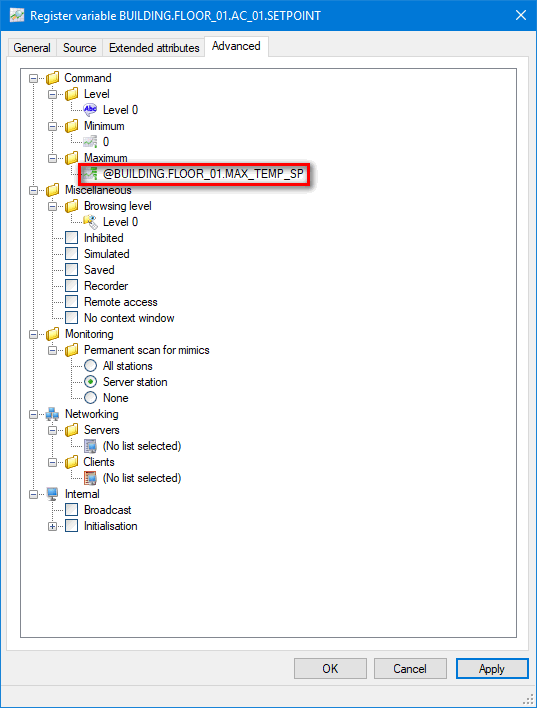
The command range is the range within which a register variable can be forced. The command range must fall within the display range. The command range properties are entered in the Advanced tab and are only available when the Command option is set. The command range can be entered either directly as a number or as the names of other register variables. If a variable name is entered, the value of the variable is used and the range can be changed dynamically at run-time. Show picture
Configuring the format string
The format in which a variable is displayed is configured either by the animation displaying it, or by a format string. The format string can be entered in the Format property of the General tab or, when it is displayed in a mimic, the string of the animation’s support drawing element.
The form of the format string is ##.##, where the number of #'s specify the number of significant figures before and after the decimal point. The displayed value is automatically rounded up or down as necessary. Other characters may also be used in the format string to signify special options.
|
Character |
Meaning |
|
#u |
Display the register's units text with the value. |
|
#h |
Display the Register in the format Hour.Minute.Second. The value of the variable represents the number of seconds. |
|
#b |
Display a null field when the value of the Register is zero. This may be used in conjunction with #u. |
|
#d |
Display the Register in the format Day.Hour.Minute.Second. The value of the variable represents the number of seconds. |
|
#t |
Display the register in the format xxdxxhxxmxxsxxxms. The value of the register represents the number of milliseconds. |
|
#t1 |
Display the register in the format xxdxxhxxmxxs. The value of the register represents the number of milliseconds. The milliseconds are not displayed. |
|
#t2 |
Display the register in the format xxdxxhxxm. The value of the register represents the number of milliseconds. The milliseconds and seconds are not displayed. |
|
#t3 |
Display the register in the format xxdxxh. The value of the register represents the number of milliseconds. The milliseconds, seconds and minutes are not displayed. |
|
#t4 |
Display the register in the format xxd. The value of the register represents the number of milliseconds. The milliseconds, seconds, minutes and hours are not displayed. |
|
# |
Digit placeholder. Display a significant digit or 0. If the expression has a digit in the position where the # appears in the format string, display it; otherwise, display nothing in that position. |
|
0 |
Digit placeholder. Display a significant digit or nothing. If the expression has a digit in the position where the 0 appears in the format string, display it; otherwise, display a zero in that position. If the number has fewer digits than there are zeros (on either side of the decimal) in the format expression, display leading or trailing zeros. |
|
. |
Decimal placeholder. The decimal placeholder determines how many digits are displayed to the left and right of the decimal separator. |
When the format string is to be provided by the animation’s support drawing element it must be preceded by the @ character. This will ensure that, in the case of the variable definition already containing a format string, the one in the drawing element takes precedence.
If the value of a variable exceeds that supported by its display format, any display of the variable will be replaced by a row of asterisks.
Initializing a register with an internal source
A register variable with an internal source can be provided by an initial value using the property Internal.Intialisation.Value. The value must be within the variable's range and is used to initialize the variable's value when the project is started.