What is a Project?
A project (or application as it is sometimes known) is the configuration that is required to customize the operation of PcVue for a particular use. A typical project will include mimics, variables, communications, data recording, user configuration and programs.
You can create a
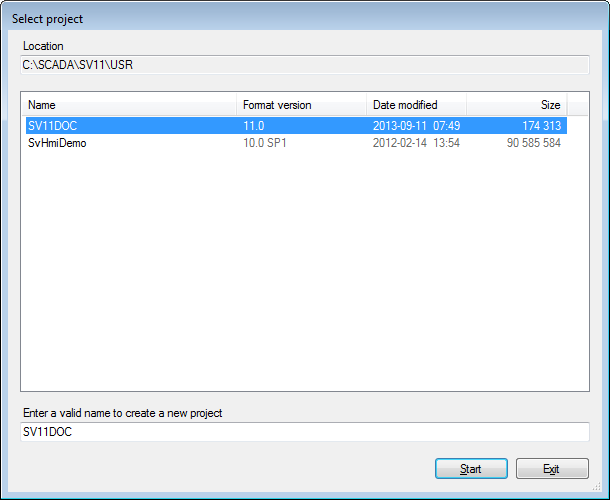
new project or select an existing one using a dialog displayed by the
Select Project command on the Configure.Project sub-menu.  Show picture
How to create a new project
- From the Project sub-menu, display the Select Project dialog.
- Type the name of the new project into the text field at the bottom of the dialog. See below for limitations that apply to project names.
- Select the OK command button. PcVue will create the new project.
- Shut down and restart PcVue. You can then select the new project for opening.
How to select an existing project
- From the Project sub-menu, display the Select Project dialog.
- Select the name of the project by double clicking on its name in the list of projects.
- Select the OK command button.
- Shut down and restart PcVue.
The project folder structure
Each project appears as a sub-folder under the project
root folder, USR. Normally the project root appears under the PcVue
root folder although, using the -b option in the command line that starts
PcVue, it can be located elsewhere. Show picture
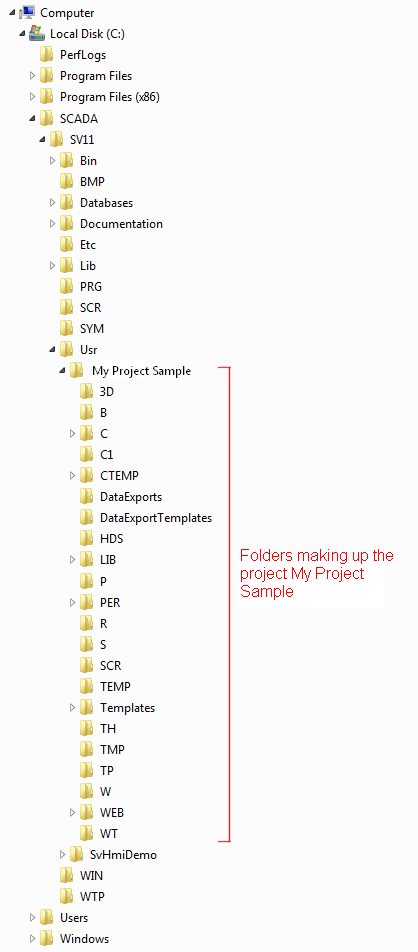
The use of the main folders is as follows. Note that some of the folders are for internal use and are therefore not mentioned here.
|
Folder |
Usage |
|
3D |
Three-dimensional mimics (if used). |
|
B |
Images that appear in the local library. |
|
C |
Main configuration files. |
| C1 | Configuration files to be imported. |
| CTEMP | Temporary copies of the configuration files (C plus C1) used while a project is loading. |
| DataExports | Default output folder for Data Export. |
| DataExportTemplates | Default template folder for Data Export |
|
HDS |
Historical Data Server files. |
| Lib | Local libraries root folder. See the topic What is a library?. |
|
P |
SCADA BASIC program files. |
|
PER |
The files used for storage of persistent data, in particular the value of saved variables, extended attributes and alarms. |
|
R |
Recipe definition files. |
|
S |
Symbols that appear in the local library. |
| SCR | VBA files. |
| Templates | Templates and parameters. |
|
TH |
Archive unit files containing historic data. |
|
TP |
Default location of any files used by SCADA BASIC. |
|
W |
Window (mimic) definition files. |
|
WEB |
WebVue resource files and image cache. |
|
WT |
Window template files. |
Project names
The following limitations apply to project names.
- The length, including the path, is limited to 200 characters.
- Project names cannot
- Contain any of the following characters /\?:*"<>¦
- Contain any control or wildcard characters
- Contain leading or trailing spaces
- Be '.' or '..'
- Be reserved system names such as 'AUX', 'PRN', 'NUL', 'COM1' ETC.