


Context
On versions of PcVue prior to 16, there was no native browser (Web Browser Control). Instead, it was possible to use a browser via ActiveX.
However, when using this browser, error messages may appear when loading web pages, indicating compatibility issues. By default, ActiveX uses the Internet Explorer 7 web engine, which is obsolete and does not support modern website features.
For example, you might encounter the message: ‘Webvisu not supported due to missing browser feature HTML5-Canvas’.
Solution
IMPORTANT: This method contains steps that tell you how to modify the registry. However, serious problems might occur if you modify the registry incorrectly. Therefore, make sure that you follow these steps carefully. For added protection, back up the registry before you modify it. Then, you can restore the registry if a problem occurs. For more information about how to back up and restore the registry, click the following article number to view the article in the Microsoft Knowledge Base: 322756 – How to back up and restore the registry in Windows
To resolve this issue, you can force ActiveX to use the Internet Explorer 11 web engine, which is more recent. Here is how to proceed:
Note: Ensure you have administrator rights on your machine to make these changes.
1. Open the Registry Editor: Type regedit in the Windows search bar and press Enter
2. In the Registry Editor, navigate to the following path: HKEY_CURRENT_USER\SOFTWARE\Microsoft\Internet Explorer\MAIN\FeatureControl\FEATURE_BROWSER_EMULATION
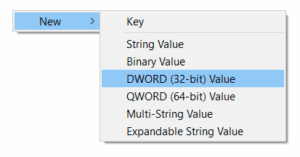
3. Right-click in the right-hand pane, select New, then DWORD (32-bit) Value.
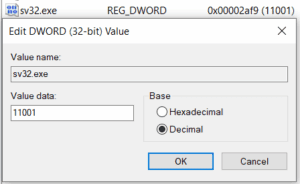
4. Name it sv32.exe, double-click on it, and assign it the value 11001 (select Decimal).
The value 11001 (in decimal) on these registry keys forces ActiveX to use the IE11 engine instead of the obsolete IE7 engine.
5. Now, navigate to this second key: HKEY_LOCAL_MACHINE\SOFTWARE\Microsoft\Internet Explorer\MAIN\FeatureControl\FEATURE_BROWSER_EMULATION
6. Reproduce exactly the same steps to create a DWORD sv32.exe with the value 11001.
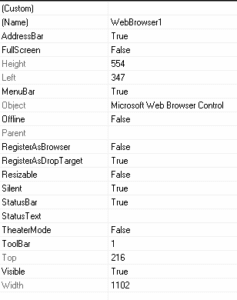
You can activate the silent mode on the properties of the Microsoft® ActiveX control browser to avoid error messages :
Conclusion
Restart your PcVue project. By following these steps, you should be able to resolve the compatibility issues with the Microsoft® ActiveX browser.
Note
If you set the DWORD registry key to 0, it will select the latest Microsoft® browser available on the PC.
Created on: 12 Dec 2025 Last update: 15 Dec 2025