Reference architectures
This topic describes some of the most common architectures that can be used as reference for designing your system.
From a standalone host with a single instance of PcVue to high-availability multi-site client/server architectures, and from isolated automation networks to highly interconnected systems, there are endless possibilities.
Designing and sizing a system based on PcVue means taking into account the specific constraints and requirements of the target system, including the regulatory framework the system is subject to, and also the technical and organizational measures in place. The list of criteria for design choices includes:
- Number of users
- Type and number of operator workstations
- Availability
- Flexibility
- Scalability
- Resilience
- Maintenance and system life cycle management
Choices related to hosts platforms and environment are part of the design and deployment choices made by the entity in charge of the target system. This documentation makes no assumption and remains generic about:
- Hardware form-factor for hosting the operating system and software
- Installation directly on a computer host or installation in a virtual machine
- Physical or logical network segmentation
- Availability of a separate admin network
- ...
The architectures presented here are logical views of how roles and functions of PcVue can be distributed. They highlight typical network segmentation practices based on zones and conduits and how to apply them to a PcVue system. They are not implementation references but can be used as a base to design your actual specific system.
See Hardening guide overview for more information about system design principles we recommend you to follow.
See Overview for more information about roles and functions.
Contact the technical support for more information and recommendations.
See the Firewall configuration guideline for more information about setting up the proper firewall rules.
Supporting infrastructure
Deploying a PcVue system typically requires several components as part of a supporting infrastructure, including:
- A Windows Domain
- A Domain Name Server (DNS) for host name resolution
- Active Directory - Directory Services (AD-DS) for centralize management of users, user groups and authorizations
- Active Directory - Certificate Services (AD-CS) or equivalent for centralized management of digital certificates
- Fail-safe networks - Typically PRP/HSR
- A global clock for time synchronization
- Firewalls for controlling network traffic - Both local firewalls on hosts and appliances at network interconnections
- Routers
- Reverse proxy
- Web Application Firewall (WAF)
- Bastion - For remote admin access or for protecting RDS servers
- Log and metrics aggregator
- Event detection and reaction
An admin network must be in place to support administrative tasks including distribution of updates, time synchronization and log aggregation. For the sake of simplicity, it is not represented in the architectures described here.
The exact requirements on the supporting infrastructure depends on several factors. See Overview hardening guide for more information.
A system is as secure as its supporting infrastructure.
Standalone station
A Standalone station is usually an operator panel, typically used as front panel for a machine. It is the simplest architecture with all functions and roles integrated into a single host running PcVue in an interactive session.
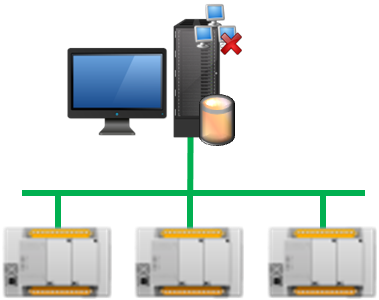
It is intended for single user application, up to a few hundreds I/O variables, connected to 1 or 2 field devices. All functions and roles, typically data acquisition, alarms, historical data and HMI, are performed by a single host that does not have high availability and offers limited resilience.
It should not be used without additional measures if interconnections or fail-safe traceability of operations are necessary.
Requirements
- The deployment of this architecture requires a minimum level of network expertise.
- The Standalone station host and field devices may or may not be on the same subnet.
- This architecture can be deployed with minimum requirements on a supporting infrastructure.
Benefits
- Only a single computer is necessary to host PcVue.
- The host only requires a single network interface card.
- Works out of the box using IP addresses.
- A DNS is not required for name resolution on Windows platforms.
- Can work with a Windows desktop operating system.
Limitations
- Expect limitations in term of performances and reliability if the amount of I/O variables or the number of field devices grows.
- 24/7 operations are interrupted for maintenance, operating system updates, project changes or product updates.
Host Deployment Console
The HDC must be installed on the host for deployment.
Firewall settings
Communication between the Standalone station host and field devices uses the only available network, the proper ports must be open depending on the data acquisition drivers in use. All other incoming and outgoing connections must be blocked.
Client/server networking
As soon as more than one user seat is required, or if the system constraints require separating host roles, a client/server architecture must be used.
With this architecture, several client station hosts can be deployed, and roles such as data acquisition, alarm, historical data production and HMI can be distributed across client and server hosts.
When high availability and resilience are required, this architecture can be augmented with data acquisition server and Historical data server redundancy based on server station associations.
A variation is to also include a Web backend, a Web Server and Web clients, thus combining permanent operator's seats based on the PcVue desktop application and one-off user connections based on a Web browser.
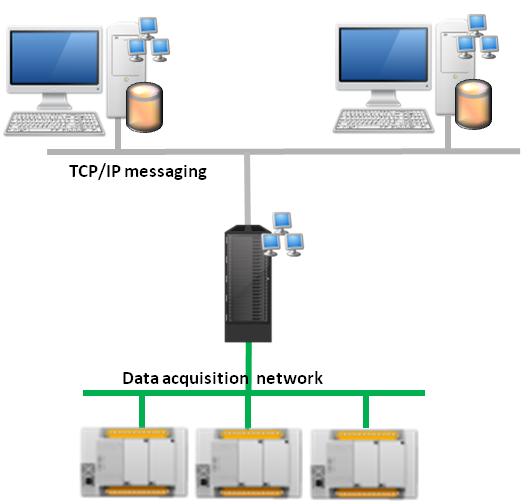
Only data acquisition servers should be able to access to the field devices, preferably based on one or more physically separated networks. Other station hosts have no valid reason to connect to field devices.
In low-end client/server architectures, the Engineering station may be connected to the Industrial network. On a higher-end system, the Engineering station is not directly connected to the system in production, and a separate test and validation platform is in place.
To make maintenance and deployment of a project easier and faster, central project management can be used. Different versions of the project are centralized on a file server (not represented). Usually a dedicated engineering station is in place to make configuration changes, and project versions are stored on the centralized file server. Any PcVue host can automatically load and run a version of the project from the central project folder.
Requirements
Requirements vary widely depending on the scale of the system, from a single data acquisition server with 3 clients up to dozens of redundant servers aggregating hundreds of thousands I/O variables from a large number of field devices and a high-end control room with dozens of user seats.
- The deployment of this architecture requires network expertise.
- This architecture requires an adequate supporting infrastructure.
- This type of architecture is rarely isolated, interconnections must be designed and managed to protect the system.
Benefits
- Very versatile to distribute data processing across multiple server hosts.
- Designed to scale horizontally and vertically, offering high-availability and resilience.
- 24/7 operations can be ensured.
Limitations
- It should come with no surprise, but at large scale, it requires an engineering, deployment and maintenance strategy.
Host Deployment Console
The HDC must be installed on all PcVue station host for deployment.
Firewall settings
For communication between data acquisition servers and field devices, the proper ports must be open depending on the data acquisition drivers in use. Client/server networking must be filtered to only allow legitimate network flows. All other incoming and outgoing connections can be blocked.
Multi-station with a Remote Desktop Server for deploying client stations
This architecture is the same as the previous one from the PcVue client/server networking point of view, except that a RDS host and lightweight terminals are used as a way to rationalize the deployment of client station hosts.

Depending on how exposed is the system, additional measures can be necessary to protect the RDS host.
In many cases, and in particular if the RDS clients are located on an external network and used for remote access, the RDS host must be located in an Industrial DMZ and behind a bastion.
Principles of web-based architectures
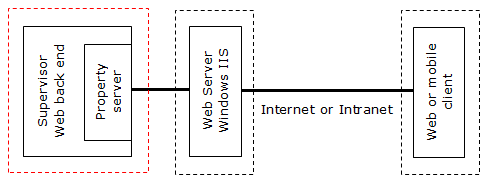
In web-based architectures, the web server is based on Microsoft's Internet Information Services and hosts the PcVue web apps and web services. The web server can be on the same host as the Web & Mobile back end server station, or on a different one.
The web server role is mandatory if your application uses any of the following components.
- WebVue
- TouchVue
- SnapVue
- The WebScheduler
- Web Services Toolkit clients - Including 3rd party tools and Add-ons based on the Web Services Toolkit
PcVue itself is not installed on the web server. You install the Web Deployment Console instead, that helps you deploy the web apps and web services in IIS.
The Web & Mobile back end server is a host running PcVue. Its role is to act as a gateway to provide data to the web server. Deploying a Web & Mobile back end is required when a web server is necessary.
PcVue must be installed on the host that is the Web & Mobile back end, and the application must include the back end configuration. The web back end may, or may not, be on the same host as the web server.
All in one web-based architecture
In this scenario the PcVue Web & Mobile back end station and the PcVue web server components are hosted and run on the same host.
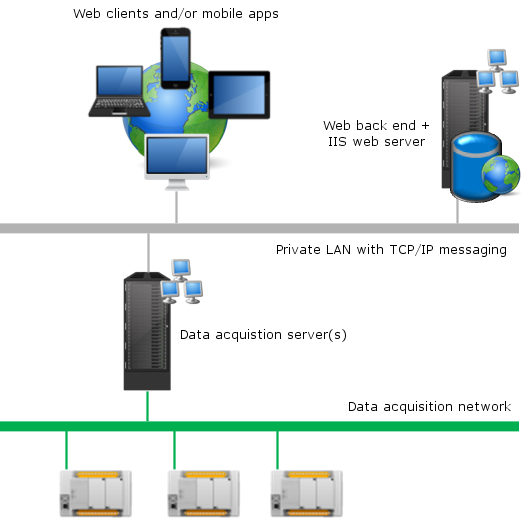
Intended for simple deployment scenarios with the web and / or mobile client systems on the same network as the PcVue web back end server. Typically used when the network is private and fully isolated from outside access.
Should not be used when the network is open to incoming requests from outside networks or open for unprotected access from unknown devices. Such use cases require more security measures, including VPN-tunneling, a reverse-proxy and Web Application Firewall, and better network segregation.
Requirements
- The deployment of this architecture requires a minimum level of network expertise.
- Requires all hosts and mobile devices to be on the same subnet, typically the industrial network, including web and mobile clients, the web server and the PcVue web back end station.
- Web clients on this network are supposed to trust the Web Server machine without reservation as they are on the same, and by definition, private network.
- This architecture works with minimum requirements towards the trustworthiness of the web server certificate. A certificate from a public certification authority is not mandatory to establish trust with the Web Server.
Benefits
- Only a single computer is necessary to host both the PcVue web back end station and the web server.
- The host only requires a single network interface card.
- Works out of the box when using the IP address of the web server host to connect web and mobile clients.
- A DNS is not required for name resolution on Windows platforms. The web server host may be addressed by its hostname from any Windows-based web clients.
- Can work with a Windows desktop operating system on the web server host if serving a limited number of users, although a server operating system is still recommended.
- When using non-Windows client devices, Android, iOS, Linux etc., the presence of a DNS server is necessary for name resolution. This can be achieved by using a Windows Server operating system for the web back end station and the activation of the DNS server role.
- While this cannot be recommended in production, usage of a self-signed certificate works out-of-box, with the need to add a security exception on the client's web browser and to enable the option Ignore Certificate Errors on mobile applications. If there is an Active Directory server accessible from the network, a domain certificate can be issued from the Active Directory server and trusted by all the clients of the domain (by domain policy or via a corporate MDM system).
Limitations
- Expect limitations when hosting the web server on a Windows desktop operating system. In particular, the maximum number of client connections that IIS can handle is limited.
- Microsoft® Edge does not allow storing cookies if the hostname is not a FQDN. This causes troubles with web components. It can be overcome by setting the web site binding to:
https://<hostname>.local - Limited performance may be experienced, particularly during WebVue client loading, when using untrusted certificates because, in such circumstances, files are not cached by web browsers, and therefore re-downloaded at each connection.
Host Deployment Console
The HDC must be installed on the data acquisition servers and on the Web back end for deployment.
Web Deployment Console
The WDC must be installed on the Web server host. The architecture is easily deployed using the Quick Setup wizard of the WDC, with all settings at their default value.
Firewall settings
Communication between the web back end and the web server can use the local loopback and requires no further configuration. However, it is advisable to check that the following ports are not open to incoming connections from other IP addresses:
- TCP 8090 & TCP 8091
- TCP 8810 (Instant Messaging back end)
- TCP 8811 (Geolocation back end)
Name resolution
- Hostnames
- Can be used if a means is available for name resolution.
- NetBIOS will work if available and supported by web clients (Windows only, not a solution for mobile apps on Android and iOS).
- DNS is not essential but is highly recommended.
- IP address
- For TouchVue and SnapVue. Works when addressing the web server host by its IP address as for mobile apps authorization, no redirection between the authorization server and the app is required.
- For non-Windows WebVue web clients. Works when addressing the server by its IP address, given that the redirection between the authorization server and the WebVue app is also configured to be based on IP addresses.
- For WebVue web clients on mixed platforms i.e. Windows plus at least one other type of operating system. Use the WDC to create two different web sites on the web server, one with a binding for access by hostname and one with a binding for access by IP address.
Network isolation and DMZ web-based architecture
In this scenario, the PcVue Web & Mobile back end station and the web and / or mobile client are on different networks segregated by a DMZ. The inner network (LAN side of the DMZ) is seen as a private network. The outer network (WAN side of the DMZ) is a less trusted network and typically an Enterprise network. The PcVue web server components are on a host inside the DMZ and the Web back end station is on the private LAN. This architecture provides the best integration into IT infrastructures and allows for maximum compliance with IT policies and practices.
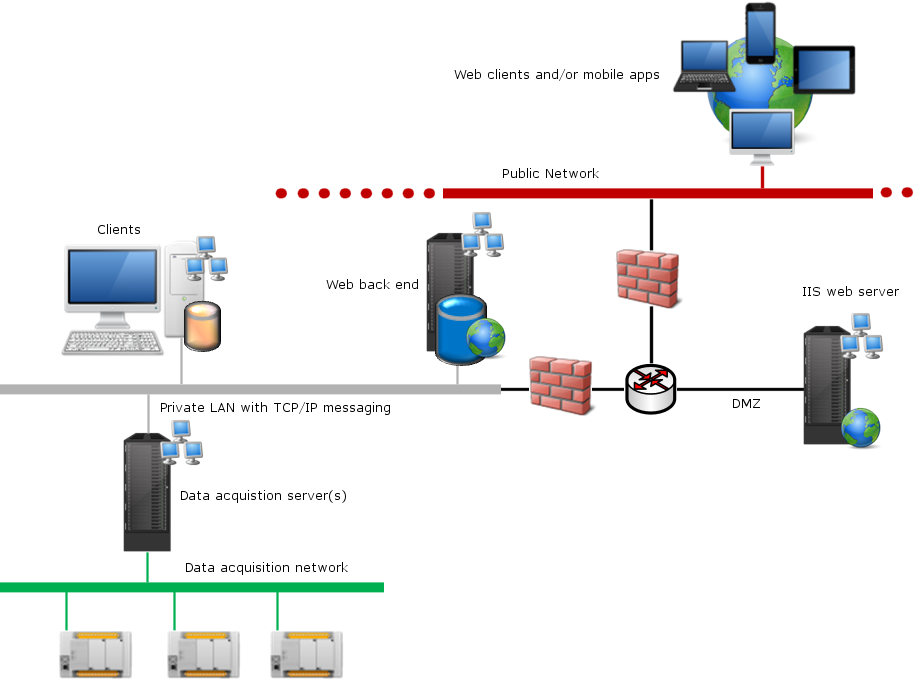
This architecture is recommended whenever the web and/or mobile clients are outside of the industrial automation network. This architecture provides maximum deployment security, in line with network segregation practices, ensuring no un-controlled direct incoming connection from outside networks to the inner industrial automation network.
This architecture should be used whenever possible.
Requirements
- The level of network and IT expertise required to deploy this architecture is intermediate to high.
- A suitable network infrastructure planning and set-up to segregate the private network from the lesser protected network. This includes a router and at least one firewall. Both common DMZ architectures, single firewall setup and dual firewall setup, can be used.
- Support of the end user’s IT department is likely to be required, to properly set up network segregation, name resolution and request filtering. This includes the proper configuration of:
- DNS server
- Active Directory
- Routing
- NAT or Port Forwarding if necessary
- A reverse proxy and Web Application Firewall
- The use of a reverse proxy is recommended.
- In order to validate the identity of the web server host on the lesser trusted network and to prevent Man-in-the-middle attacks, usage of a fully trusted certificate is essential. This certificate can be issued:
- By the IT department with their office network Active Directory server.
- By the IT department with a public CA, if accessed from external Web/Mobile Clients.
- A DNS server is required on the lesser trusted network.
- A Windows Server operating system on the web server host, and also on the web back end station host.
- The web back end station must be accessible from the web server host at least by its IP address. Access via hostname is also possible, given that a mean of name resolution is present from within the DMZ:
- A dedicated entry in the hosts file of the web server host.
- A DNS server within the industrial automation network that is accessible from the DMZ. If not already available, the activation of the DNS-Server role on the Windows Server operating system of the web back end station can be a solution.
Allowing access from a host within a DMZ into the private network can contradicts security policies. For technical reasons however, the following ports need to be opened in that direction:
- TCP port 8090
- TCP 8810 (if requiring the Instant Messaging back end)
- TCP 8811 (if requiring the Geolocation back end)
These ports are configurable.
Benefits
- This architecture allows for convenient access from less trusted networks, typically an Enterprise network, by exposing the web and mobile services and applications of the Web Server under a Fully Qualified Domain Name.
- It allows maximum control over network traffic, in line with IT network segregation practices, making sure that there are no un-controlled direct incoming connection requests from outside networks into the industrial network.
Limitations
- WINS cannot be used for name resolution as it cannot be used across a router.
Host Deployment Console
The HDC must be installed on all hosts where PcVue is installed, including data acquisition servers, historical data servers, client stations, engineering station, and Web back end.
Web Deployment Console
This architecture can be deployed by using either of the WDC setup wizards. However, the default settings of the Quick Setup wizard will not be suitable in all situations. The WDC must be installed on the Web Server host.
Simplified NAT web-based architecture
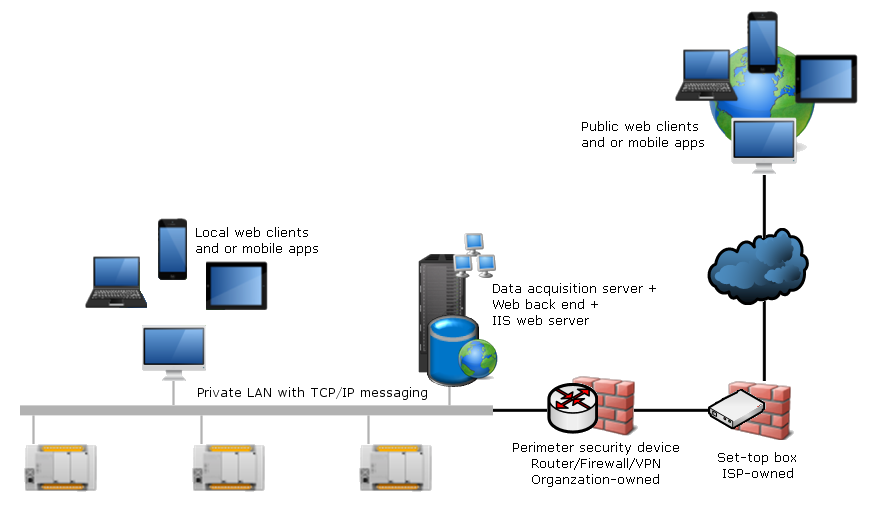
This scenario has a single private LAN where the Web server, Web & Mobile back end, data acquisition server, and historical data server reside. Internet access is used to serve a few remote web clients. The Web & Mobile clients are distributed across both sides of a NAT boundary provided by a set-top-box supplied and operated by the ISP.
This architecture is often the only option when access from Internet is required with an ISP-owned set-top box. Because you do not operate the ISP device, you should have limited trust in it, and add your own network security appliance between the set-top-box and the web server. This appliance will act as a router/firewall and VPN server, and will the de-facto be the boundary of the network you control.
Although it is technically feasible to deploy this architecture as is, it is not recommended without further security measures.
- Use of a VPN and client address locking, in which case the architecture is logically equal to that described as All-In-One.
- Using the network perimeter’s dedicated DMZ port for establishing a dedicated network segment, in which case the architecture is a simplified version of Network Isolation and DMZ.
It is also recommended to separate the Web back end and the Web Server as described in Network Isolation and DMZ.
Requirements
- The level of network and IT expertise required to deploy this architecture is low to intermediate.
- It is assumed that the connection between the private network and the Internet is with a typical ISP-provided set-top-box.
- Network Address Translation (NAT), or Port Forwarding, configured on the network boundary.
- To validate the identity of the Web Server host on the lesser trusted network and to prevent Man-in-the-Middle attacks, usage of a fully trusted certificate is necessary.
- This certificate can be issued by the IT department via a public CA. Necessary if the Web Server is accessed by external Web and Mobile clients (typical access from the Internet by client devices / hosts not in a trusted relationship with the corporate network infrastructure).
- The web server host must be accessible by the Web and Mobile clients from both network segments.
- This can be achieved if the web server is well known on both network segments under the same FQDN.
- If this is not the case the possibility for the Web and Mobile clients to directly connect to the web server host by using its FQDN without the Https requests having to leave the private network is better. Usage of NAT Loopback / Hairpinning is suggested in this case.
- If none of these options is possible, it is recommended to create two different sites via the WDC, which both connect to the same web back end station.
Benefits
- This architecture allows for convenient access for Web and Mobile clients located on the industrial network and on the internet.
- This architecture is a first step in a migration process of legacy WebVue systems offering remote web access.
Limitations
This deployment scenario offers limited network security if a specific device is not added to control the network perimeter:
- You are relying on a set-top-box owned by an ISP to control the network perimeter and remote connection.
- Consequently, a host that is part of the Industrial Control System should be considered directly exposed to the Internet.
In a worst-case scenario, potential security vulnerabilities on several levels could be exploited by an attacker to gain access to the Industrial Control System.
Because you do not operate the ISP-owned device, you should have limited trust in it, and add your own network security appliance between the set-top-box and the web server. This appliance will act as a router/firewall and VPN server, and will de-facto be the actual boundary of the network you control.
Host Deployment Console
The HDC must be installed on all hosts where PcVue is installed, including data acquisition servers, historical data servers, and Web back end.
Web Deployment Console
This architecture can be deployed by using either of the WDC setup wizards. The WDC needs to be installed on the Web Server host.
Firewall settings
Communication between the web back end and the web server can use the local loopback and requires no further configuration. However, it is advisable to check that the following ports are not open to incoming connections from other IP addresses:
- TCP 8090 & TCP 8091
- TCP 8810 (Instant Messaging back end)
- TCP 8811 (Geolocation back end)
Multi-site hypervision architecture
When multiple sites need be monitored and controlled, the dependency on a WAN is not an option, and this is when hypervision architectures come into play.
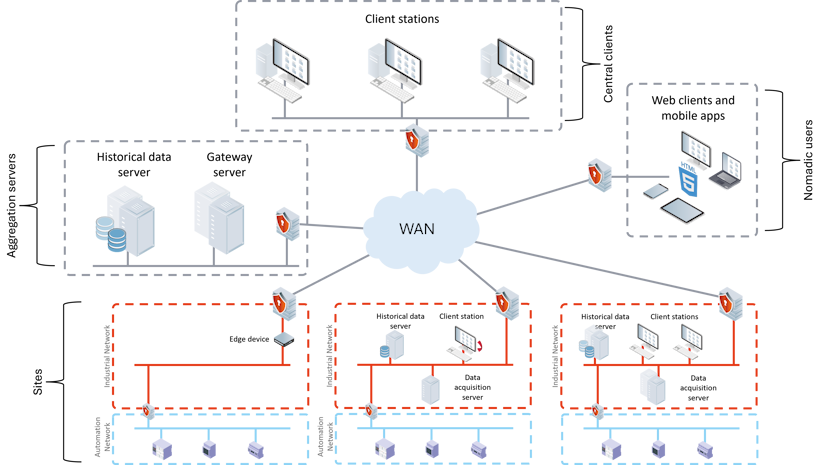
PcVue supports such architectures, they can be represented logically as follow:
The architecture typically includes:
- Several geographically dispersed sites, with a varying degree of complexity. A site may only consist of an automation system and an edge gateway to transmit data over the WAN. It may already have a local industrial system including a local monitoring and control system. It may consist of a full fledged high availability system with data acquisition and historical data server redundancy.
- A WAN, typically brown fiber leased lines, equipped with end-to-end VPN encryption.
- An aggregation infrastructure where data from local sites are gathered together by gateway servers. Central historical data servers act as aggregators of local historical data, and produce archive data for sites that are not equipped with local archiving.
- Central client stations, think regional or national control room, where installation from all sites can be monitored and controlled, including local/remote capabilities, interlocking for commands and alarm centralization.
- Other types of client access, via Web & mobile apps for nomadic users for example, connecting to an enterprise-grade web server infrastructure.
The diagram shows firewalls, but to offer the level of security and resilience that kind of system require, the reality of the infrastructure must account for the level of risk the system is exposed to. In all cases, there will be a mix of industrial DMZ to protect each network segment exposed to the WAN, a parallel infrastructure for administration (including log aggregation, patch distribution...), VPN segments, bastions, reverse proxy, Web Application firewall, etc.
Using PcVue as a gateway server brings a high level of isolation between network zones when building such 3-level architectures.
Such a gateway server can be used in several architectures where there is the need for network segregation based on a DMZ.
- As a gateway node in client/server systems. It can serve data to clients located in another zone (such as Remote Desktop clients).
- As a data concentrator node in distributed systems. It can serve data to upper level central servers located in a separate zone (multiple geographically dispersed systems and one central system).
- As the Web Server for WebVue, TouchVue, SnapVue or the Web Services Toolkit. PcVue web capabilities are used to serve remote clients.