Identity management and ACL
Account management policy
It is necessary to differentiate the various types of Windows accounts that may be created and in use on a given system for operators, developers, administrators and super administrators.
In addition, accounts are necessary for the SV Core Daemon, SV DbConnect, SV Core Session Host, SV Core Security and SV Core Data Isolation services.
Once these accounts have been selected and established, their permissions at the system level can be defined:
- ACL to protect access to files and folders on hosts running PcVue
- ACL to protect access to shared folders and resources
- Identities to control COM/DCOM interfaces
- On databases used by the application to limit access to archive servers so they can store data, and to operators and their workstations so they can read stored data
For client/server applications, the objective is to limit access to workstations according to individual roles defined in the PcVue user profile. For example, an operator does not need access and login on a server station, and depending on your internal policy, a user with development permissions may or may not be allowed to login on a station in production.
PcVue does not create any account at the Windows or AD-DS levels. All accounts and groups mentioned in this document must be created by a user with Administrative privileges.
Use separate domain user accounts for services and applications
We recommend you create dedicated domain user accounts and groups for running PcVue services and interactive applications.
The main reasons to use dedicated domain user accounts instead of the built-in identities are as follows:
- Using domain user accounts consistently makes it easier to manage multi-tier application infrastructures.
- By using domain user accounts as service account logons, you can audit access locally and across your network in a consistent way.
- Domain user accounts can be more definitively targeted with Group Policy.
As part of Group Policy, make sure you deny your domain service accounts the Log on locally permission (among others). This measure prevents a malicious user from succeeding in an interactive logon attempt by using a breached service account.
Be vigilant regarding the Everyone and Authenticated Users groups
Everyone and Authenticated Users are dynamic security principals, which means that their membership is controlled by your network environment itself and that administrators cannot control membership to these group identities.
The Everyone identity includes all authenticated and unauthenticated network users (this includes Local Service).
The Authenticated Users identity includes all domain user and computer accounts who have successfully authenticated to Active Directory. This group includes the Local System and Network Service built-in service account identities.
Thus, a key point of security is to keep a careful eye on where and how we are assigning access permissions to these two special groups.
You can control which accounts have which system privilege by using Local Security Policy that can be accessed from the Windows Control Panel or directly from the SV Core Management Console using Tools. Local Security Policy. The relevant Local Security Policy path is Security Settings\Local Policies\User Rights Assignment.  Show picture
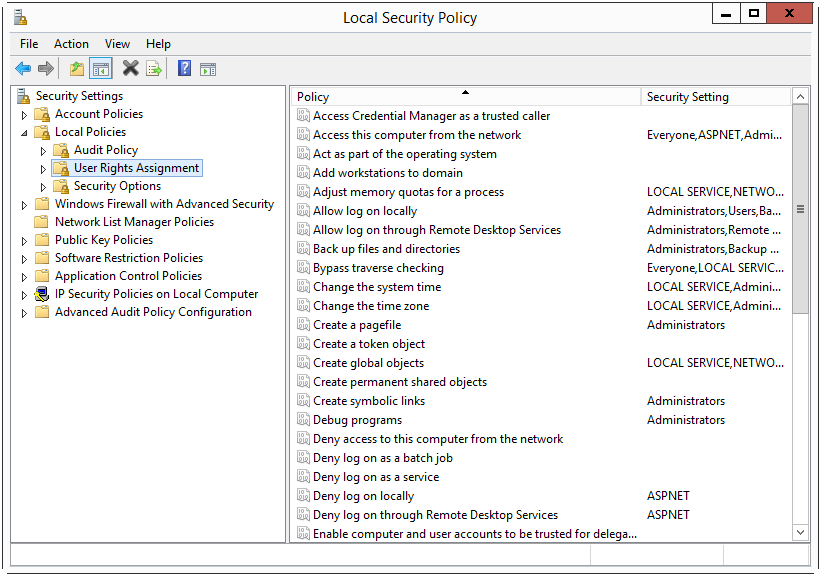
System privileges are also called user rights. Either way, both refer to system-wide abilities such as login on as a service, login on locally, changing the system time, and so forth.
User accounts
The table here described the typical list of legitimate users of PcVue, the usual list of user roles. It includes the tasks they typically perform in PcVue, tasks they perform at the operating system or infrastructure levels, and the necessary permissions they should be granted.
| Role | Description | Tasks |
| Operator (Op) | An Operator is a user with minimum privileges who can only run a PcVue project in runtime mode. Hence, the operator cannot modify the configuration or the host environment. |
Operators can use the HMI to:
In addition, in some cases, they can dynamically adapt part of the configuration, including threshold values or values of extended variable attributes. |
| Application Developer (AppDev) |
An Application developer is a user who can run PcVue in design mode. He is responsible for creating, developing, and maintaining (upgrading or correcting) the configuration of the PcVue application. He is not allowed to access or modify sensitive information. While his permissions in PcVue allow him to perform high stake actions within the PcVue project and libraries, it is assumed that he does not have elevated privileges on the host, thus he cannot modify the underlying software installation nor the system environment. |
Application Developers can use the product to:
|
| Application Administrator (AppAdmin) | An Application administrator is a user who can modify sensitive information in a PcVue project. It is assumed that such a user is granted Administrative privileges on hosts where PcVue runs. |
Defines sensitive information, such as certificate object, security altering settings, or elements heavily dependent on the infrastructure (connection strings to databases for example). At the operating system level, in charge of software installation, deployment and updates |
| Application Super Administrator (AppSAdmin) | An Application super administrator is a user who can modify sensitive information in a PcVue project. It is the only role granted the permission to manage AppAdmin and AppSAdmin user accounts, including his/her own account. It is assumed that such a user is granted Administrative privileges on hosts where PcVue runs. |
All tasks of an AppAdmin, plus managing the AppAdmin and AppSAdmin user accounts in PcVue. |
While a user may be in charge of tasks belonging to different roles, an Application developer who is also an Application administrator for instance, we recommend a strict segregation of roles by not associating profiles to a user in a way that would increase risks if credentials are stolen.
See User accounts overview for more information about PcVue user directory configuration and operations.
Service accounts
PcVue includes the following services and associated default service accounts:
| Name | Description | Default account |
| SV Core Daemon | Enables SV Core to run as a service. | Local Service |
| SV Core Session Host | Provides features for SV Core to run on a Remote Desktop Session Host server. | Local service |
| SV Core Security | Provides features for SV Core components that need to run in a security context. | NT SERVICE\svCoreSecurity |
| SV Core Data Isolation | Handles delegated data access. Used by Central project management to handle file operations. | Network service |
| SV DbConnect | Hosts the SV DbConnect service. | NT SERVICE\svDbConnect |
Access control lists on folders and files
For application folder permissions, it is recommended to follow the least privileged rule. This rule consists in granting only the necessary permissions.
In accordance with the role definitions above, the required ACL are described in the tables below for the following high-level folders:
-
Program folder - Default C:\Program Files\ARC Informatique\PcVue 17\
-
Application data folder - Default C:\ProgramData\ARC Informatique\PcVue 17\
-
Project folder - Default
In the following tables, the notation is:
- E stands for Execute.
- R stands for Read.
- M stands for Modify and includes Read+Write+Delete.
- FC stands for Full Control
It is assumed that if Central project management is in place, the SV Core Data Isolation service is running on all PcVue station hosts.
See How to manage project and library versions for more information.
The Windows user account that runs PcVue must have the Read and Execute Permissions on the Program folder, by default C:\Program Files\ARC Informatique\PcVue 17\
The exact permissions required depends on the station host and vary depending on the sub-folders :
- Read and Modify Permissions required on sub-folders \dumps and \logs on all station hosts.
- On an engineering host, the Read and Modify Permissions are required on the project folder so configuration changes can be saved.
- On a host in production, the Read Permissions is required on the project folder and all sub-folders and files it includes. The Write Permissions is required on a subset of files where persistent data are stored.
| Application data sub-folders | Op | AppDev | AppAdmin | AppSAdmin |
| <AppDataFolder>\Usr | RM | RM | R | FC |
| <AppDataFolder>\etc | R | RM | R | FC |
| <AppDataFolder>\pki | R | R | RM | FC |
| <AppDataFolder>\bmp | R | RM | R | FC |
| <AppDataFolder>\databases | R | R | R | FC |
| <AppDataFolder>\dump | RM | RM | RM | FC |
| <AppDataFolder>\gis | R | RM | R | FC |
| <AppDataFolder>\logs | RM | RM | RM | FC |
| <AppDataFolder>\prg | R | RM | R | FC |
| <AppDataFolder>\scr | R | RM | R | FC |
| <AppDataFolder>\sym | R | RM | R | FC |
| <AppDataFolder>\tmp | R | RM | R | FC |
| <AppDataFolder>\win | R | RM | R | FC |
| <AppDataFolder>\wtp | R | RM | R | FC |
In addition, the account used in connection strings for database archiving must have RM permissions on the folder where databases for HDS-based archiving are stored, by default the <AppDataFolder>\databases folder.
| Project sub-folders | Op | AppDev | AppAdmin | AppSAdmin |
| <ProjectFolder>\WT | R | RM | R | FC |
| <ProjectFolder>\Web | RM | RM | R | FC |
| <ProjectFolder>\W | R | RM | R | FC |
| <ProjectFolder>\TP | RM | RM | R | FC |
| <ProjectFolder>\TH | RM | RM | R | FC |
| <ProjectFolder>\Templates | R | RM | R | FC |
| <ProjectFolder>\SCR | R | RM | R | FC |
| <ProjectFolder>\S | R | RM | R | FC |
| <ProjectFolder>\R | RM | RM | R | FC |
| <ProjectFolder>\PER | RM | RM | R | FC |
| <ProjectFolder>\P | R | RM | R | FC |
| <ProjectFolder>\LIB | R | RM | R | FC |
| <ProjectFolder>\InfosLib.dat | R | RM | R | FC |
| <ProjectFolder>\Infos.dat | R | RM | R | FC |
| <ProjectFolder>\HDS | R | RM | R | FC |
| <ProjectFolder>\DataExportTemplates | R | RM | R | FC |
| <ProjectFolder>\DataExports | RM | RM | R | FC |
| <ProjectFolder>\CTEMP | R | RM | R | FC |
| <ProjectFolder>\C1 | R | RM | R | FC |
| <ProjectFolder>\C\BAK | R | RM | R | FC |
| <ProjectFolder>\.svproject | R | RM | R | FC |
The exact permissions on the folder <ProjectFolder>\TP vary depending on application design considerations.
For example, if files stored in the \TP folder are created or changed at run time, Operators may require the Read and Modify permission on the \TP folder.
| Project PER folder content | Op | AppDev | AppAdmin | AppSAdmin |
| <ProjectFolder>\PER\IEC61850_state.ini | R | RM | R | FC |
| <ProjectFolder>\PER\Traces_conf.dat | R | RM | R | FC |
In details, the required permissions for the files in the C folder are:
| Project C folder content | Op | AppDev | AppAdmin | AppSAdmin |
| <ProjectFolder>\C\AlarmConf.dat | R | RM | R | FC |
| <ProjectFolder>\C\COMM.DAT | R | RM | R | FC |
| <ProjectFolder>\C\DataConnectionsConf.xml | R | RM | R | FC |
| <ProjectFolder>\C\DataExportsConf.xml | R | RM | R | FC |
| <ProjectFolder>\C\db.dat | R | RM | R | FC |
| <ProjectFolder>\C\GeoDataConf.xml | R | RM | R | FC |
| <ProjectFolder>\C\HDSConf.dat | R | RM | R | FC |
| <ProjectFolder>\C\HDSTrend.dat | R | RM | R | FC |
| <ProjectFolder>\C\HisConf.dat | R | RM | R | FC |
| <ProjectFolder>\C\HISTO.DAT | R | RM | R | FC |
| <ProjectFolder>\C\I104Server.dat | R | RM | R | FC |
| <ProjectFolder>\C\Icons.dat | R | RM | R | FC |
| <ProjectFolder>\C\IMConfig.xml | R | RM | R | FC |
| <ProjectFolder>\C\Import_Aliases.xml | R | RM | R | FC |
| <ProjectFolder>\C\ImportReference.dat | R | RM | R | FC |
| <ProjectFolder>\C\JobsDataConf.xml | R | RM | R | FC |
| <ProjectFolder>\C\Key.dat | R | RM | R | FC |
| <ProjectFolder>\C\LanConf.dat | R | RM | R | FC |
| <ProjectFolder>\C\LPrinter.dat | R | RM | R | FC |
| <ProjectFolder>\C\MailConfig.xml | R | RM | R | FC |
| <ProjectFolder>\C\OpcDaServers.dat | R | RM | R | FC |
| <ProjectFolder>\C\Options.dat | R | RM | R | FC |
| <ProjectFolder>\C\Palcol.dat | R | RM | R | FC |
| <ProjectFolder>\C\Param.dat | R | RM | R | FC |
| <ProjectFolder>\C\ParamWS.dat | R | RM | R | FC |
| <ProjectFolder>\C\Popu.dat | R | RM | R | FC |
| <ProjectFolder>\C\Prefcol.dat | R | RM | R | FC |
| <ProjectFolder>\C\Script.dat | R | RM | R | FC |
| <ProjectFolder>\C\Security.dat | R | R | RM | FC |
| <ProjectFolder>\C\Station.dat | R | RM | R | FC |
| <ProjectFolder>\C\SvConf.dat | R | RM | R | FC |
| <ProjectFolder>\C\TemplatesConfig.xml | R | RM | R | FC |
| <ProjectFolder>\C\UIConf.dat | R | RM | R | FC |
| <ProjectFolder>\C\UIVConf | R | RM | R | FC |
| <ProjectFolder>\C\User.dat | RM | RM | RM | FC |
| <ProjectFolder>\C\VarConf.dat | R | RM | R | FC |
| <ProjectFolder>\C\Varexp.dat | R | RM | R | FC |
Permissions for database archiving with SQL Server
When using database archiving based on the Historical Data Server, the account used to connect to the database is defined as part of the connection string, either a SQL Server account or a Windows account. Permissions and roles granted to the account on the SQL Server instance and the databases must be verified and tuned if necessary.
It is recommended to have a dedicated Historical data server host (or Historical data server association) with PcVue running as a service.
If Windows authentication is used in the connection string, the connection to the database is based on the identity with which PcVue as Windows service is running.
If PcVue is running as an interactive application, the identity of the current Windows user applies. It may be an App Developer on an engineering station host, or an Operator on a client station host in production.
The SQL Server instance is deployed by a user with Administrative privileges, an admin or super admin using SQL Server tools. Details are out of scope of this documentation.
The tables below assume you want to minimize permissions on the SQL Server instance. Even if discourages, all operations could be performed with an account with privileges higher than public (think sysadmin).
For database archiving to perform as designed, the list of roles that must be granted is the following:
| Roles | Database creation | Database schema update | Run time archiving | Emergency purge |
| Server roles | db_creator | public | public | public |
| database roles | db_ddladmin | db_datareader db_datawriter |
db_owner |
Run time archiving relates to nominal operations consisting in storing new data and retrieving data for display or export.
Database creation and database schema update relate to configuration and deployment operations, when a database archive unit is newly added to the project configuration and is actually created on the SQL Server instance at next startup, or when the data to archive is changed (new column to be added to an existing table).
Emergency purge is optional and depend on the configuration. It consists in a record deletion than only requires db_datawriter, but is following by a shrink file operation that requires higher privileges, typically db_owner on the database or sysadmin on the server. If what you want is too minimize permissions, emergency purge should not be enabled, compensated by close monitoring of the database file size.
By default, the database schema is checked for consistency against the project configuration at PcVue start up. While this is useful on an engineering station host, it requires the db_owner database role or sysadmin server role. The schema verification at start up can be disabled once the archiving configuration is stable, and it is recommended to do so in production to avoid granting such high privileges to accounts used in production.
It is assumed that Application Developers , while they are the ones in charge of the project configuration, are assisted by an AppAdmin for the connection string and database creation. In most cases, they should not be the database owner, and should not have privileges to change server and database roles for data stores used in production.
A good practice is to have an AppAdmin define the connection string with an authentication mode and identity that is correct for the database to be created at next start up. And then change the connection string (authentication mode and/or identity), to minimize the permissions on the SQL Server instance and database as described here for Run time archiving.
For database replication, the list of roles that must be granted is the following:
| Roles | Replication configuration | Replication execution |
| Server roles | public | public |
| database roles | db_ddladmin |
db_datareader db_datawriter |
Database replication configuration is achieved using the Database Manager. It automates the creation of linked servers and stored procedures for table to table copy of records.
For maintenance plans, the list of roles that must be granted is the following:
| Roles | Export task | Purge task | Defrag task | Shrink task | Custom task |
| Server roles | public | public | public | public | custom |
| database roles | db_datareader | db_datareader db_datawriter |
db_owner | db_owner | custom |
A maintenance plan allows execution of scripts and tasks useful to long term stability of the archiving process with built-in scheduling. You may prefer achieving the same with task scheduling external to PcVue.