IEC 61850 Physical Device - Advanced Properties
The Physical Device advanced properties are found in the Advanced tab of the Physical Device properties dialog. The majority of the properties are directly related to the configuration of the Physical Device and should only be changed if you fully understand their use and the consequences of changing them. The default settings will be adequate for most applications.  Show picture
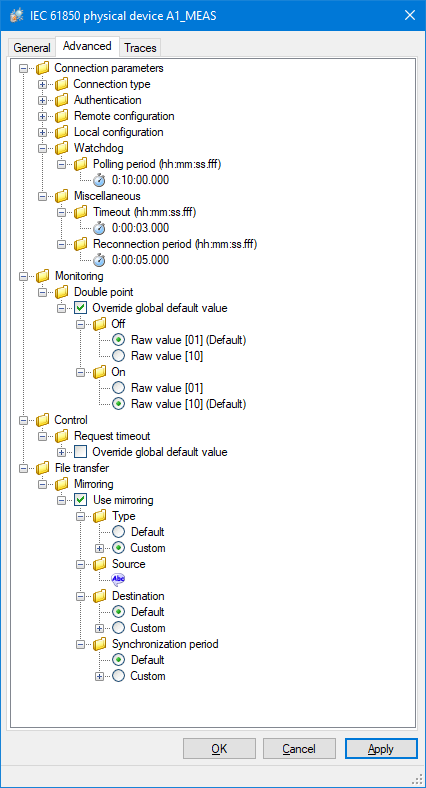
- Connection type - Connection type. Either Short, Full, Fastbyte or None.
- Authentication
- Enabled - Enable or disable the use of ACSE authentication.
- Mechanism - The name of the mechanism for ACSE authentication.
- Password - The password to be used for ACSE authentication.
- Remote configuration – The TCP remote port and MMS parameters that should be used to connect to the physical device. See the manufacturer’s documentation if specific values are to be used.
- Local configuration - The set of MMS parameters that should be used to connect to the physical device. See the manufacturer’s documentation if specific values are to be used.
- Watchdog options - See below.
- Miscellaneous
- Timeout (ms) - Request timeout. Default 3 sec.
- Reconnection period (ms) - Wait time before attempting to reconnect after a connection failure. Default 5 sec.
- Monitoring
- Double point - Customize the way PcVue interprets the double point data type.
- File transfer - See the File Transfer topic.
- Interoperability issues
- Discovery services
- Override global default value - Override the default setting for discovery services as set in the IEC 61850 settings.
- Discovery services
Watchdog options
IEC 61850 communication can be entirely event driven. That is PcVue does not poll a device, it just waits for the device to send it any changes. This is the most efficient way of communicating. However if communication to the device fails PcVue may be unaware.
To overcome this problem a watchdog is polled periodically. If the device responds then it is considered healthy. If the device does not respond then it is considered to be failed. The Polling Period should be set a value applicable to the local conditions. The default is 10 min.