BACnet BBMD Configuration
BACnet device discovery uses services that rely on the use of broadcast messages. As broadcast messages are normally not forwarded by routers, BBMD (BACnet/IP Broadcast Management Device) is a technology to enable BACnet broadcast messages to be sent to other subnets with BACnet IP devices. Each BBMD, in this case PcVue, manages a table that lists any other partner BBMD's on the network it should connect to.
In some cases, using static binding can be a good alternative to setting up a BBMD. See BACnet Device Advanced Properties for more information.
How to configure a BBMD table
PcVue BBMD tables are configured from the BBMD task.
-
Navigate to the Application Explorer configuration tree and select the BACnet node.
-
Select the BBMD task from the left pane. The BBMD configuration dialog opens.
-
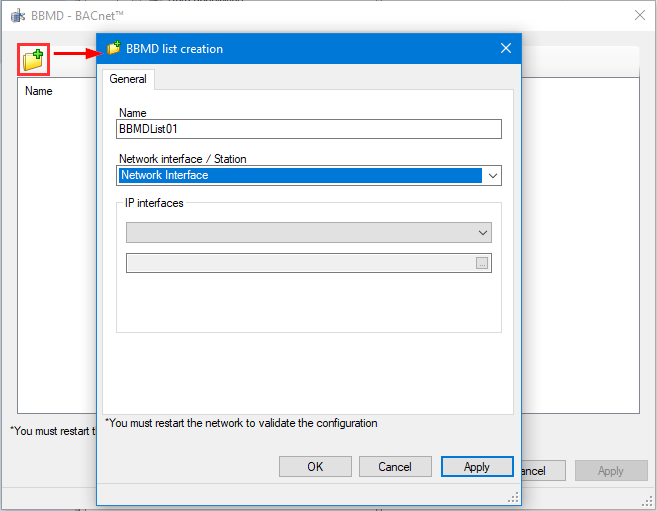
Click the yellow folder icon on the BBMD configuration dialog. The BBMD list creation dialog opens.
 Show picture
 -
Enter the BBMD list Name. A default name is suggested. Accept the name or enter one of your own.
-
Select the Network interface or Station where the list will be active. What you are defining here is the PcVue station that will act as a BBMD on the BACnet network. It can be defined by selecting a network interface that you have configured (associated to a BACnet network configuration item), or a station. In all cases, the PcVue station that is a BBMD must be a BACnet data acquisition server, i.e. it produces communication for a BACnet network item you have configured.
BBMD redundancy is not supported. The list selected must be a station name, a list or association containing only a single station.
-
Click OK to confirm the configuration. The BBMD list will appear in the right pane of the BBMD creation dialog.
-
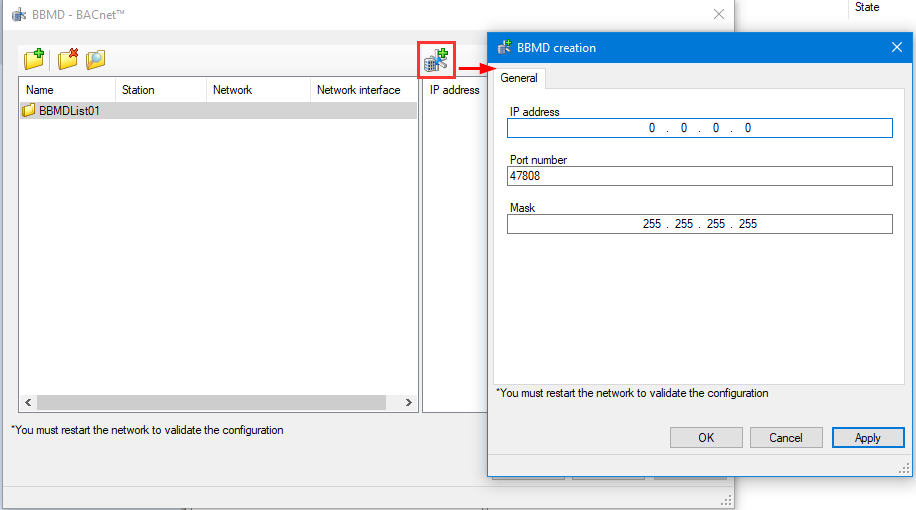
Select the BBMD list added in the left pane and click the add icon in the right pane of the BBMD configuration dialog to add a partner BBMD. What you are doing here is configuring the IP address and Port number of a device acting as BBMD on another subnet that the PcVue station will have to communicate with (as a BBMD).
Show pictureThe icons that appear upon selection of added BBMD lists and BBMDs enable you to remove or view properties of these elements
-
Click OK to confirm the configuration.
-
Repeat from Step 7 if you need to configure more than one partner BBMD for the selected BBMD list. It is typically the case if you have BACnet devices on more than 2 subnets (there should be a partner BBMD on each subnet).
-
Repeat from Step 2 if you need to configure more than one BBMD list, e.g. more than one PcVue station that will act as a BBMD. Having more than one PcVue station acting as a BBMD only makes sense if they communicate to different subsets of partner BBMD on other subnets.
While it is recommended to configure the network interface associated to a BACnet network explicitly, it is not mandatory and you may not have configured them. In such case, the BACnet driver will use the first available network interface card of the computer. And if BBMD lists are configured, the first one will be used which may result in communication failures because nothing guarantee that the first BBMD list is the good one for a given subnet.