Smart Bots operations overview
The following categories of operations can be used in a bot.
-
Data - Remote, Local, Web and Prediction
To create a new operation, select the bot state to which the operation will be added. Then right click to open the context menu, or use the New operation tool in the tool bar. Select the required operation in the drop-down menu.  Show picture
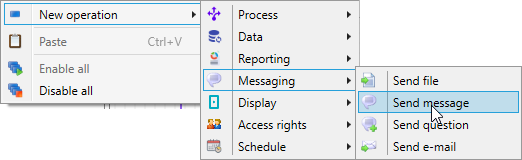
Operations are executed sequentially. The order of operation can be changed using the tools Move up (Alt+Up arrow) and Move down (Alt+Down arrow).
An operation can be associated with one or several conditions that must be satisfied for the operation to be executed. Conditions are verified only once before deciding whether the operation will be executed or not. This means that Value Changed conditions will never be satisfied and thus an operation containing such conditions will not be executed.