Configuring the Alarm Viewer's Display Mode
The run-time display mode (that is the way that the alarm list behaves) is configured using the Execution tab.  Show picture
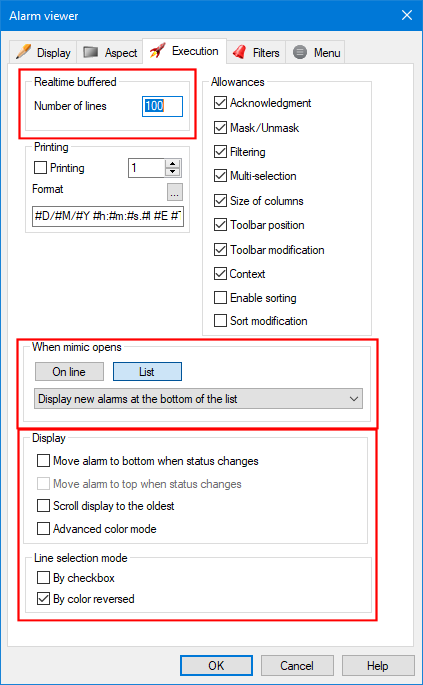
The Alarm Viewer has two basic operating modes On-line and List. The behavior of the Alarm Viewer very different depending on what options are selected. For a full explanation, see the topics Using the Alarm Viewer in list mode and Using the Alarm Viewer in On-line mode.
Configuring the mode of an Alarm Viewer when the containing mimic is opened
The main operating mode is when the Alarm Viewer is first opened is configured by the following properties.
- On line - Start the Alarm Viewer in On-line mode.
- List - Start the Alarm Viewer in List mode.
- Display new alarms at the bottom (top) of the list - Determines the initial chronological order of the alarms. Either the newest at the bottom or newest at the top.
Other display options
- Realtime buffer -
The maximum number of lines that can be displayed. Range 1 to 32000.
- In On-line mode, it is the maximum number of alarm transitions that can be temporarily stored.
- In List mode, it is the maximum number of alarms.
- Move alarms to top when status changes - When the status of an alarm already displayed in the Alarm Viewer changes it is moved to the top. Only available when the opening mode is set to List and Display new alarms at the top.
- Move alarms to bottom when status changes - When the status of an alarm already displayed in the Alarm Viewer changes it is moved to the bottom. Only available when the opening mode is set to List and Display new alarms at the bottom.
- Scroll display to the oldest - When the Alarm Viewer is opened, the list scrolls so that the oldest alarm event in the list is visible. The order of alarms in the list is not affected. When this option is selected, the Alarm Viewer can only be used in List Mode.
- Advanced color mode -Both the stroke and background colors for each alarm level, as defined in Color Preferences, are used in the alarm list. Normally the background color is not used, the background color being defined by the configuration of the Alarm Viewer.
Line selection mode
- By checkbox - A checkbox is displayed to the left of each line. When the line is selected at run-time (for acknowledge or masking) the checkbox will be checked.
- Color reversal - When the line is selected at run-time (for acknowledge or masking) the foreground and background colors will swap. This is the default mode.