Soft Keypad Management
 Show picture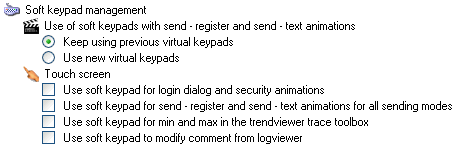
- Use of soft keypads with Send - register and Send - text animations
- Use previous virtual keypads - Use the old style (Version 7) virtual keypads.
- Use the new virtual
keypads - Use the new (Version 8) virtual keypads.
- Touch screen
- Use soft keypad for Login dialog and Security animations.
- Use soft keypad for Send - register and Send - text animation for all sending modes.
- Use soft keypad for min and max in the Trend Viewer trace toolbox.
- Use soft keypad to modify comment from log viewer.
- Process date and time input formats like the previous keypad.
There is a parameter for use with the new keypads:
See also the topic Configuring the soft keypads.