








Topic
[KB1267]Energy consumption counters using EXPORT_TREND and GETSTATISTIC

Overview
The script is structured around a single common export launcher (DoExport) that is called by six period-specific sub-routines. Each sub-routine calculates the appropriate start/end timestamps for its period and invokes the common launcher.
Two trend variables are sampled per export:
| Trend variable | Meaning |
|---|---|
@BUILDING.ACTIVE_ENERGY | Active energy (kWh) |
@BUILDING.REACTIVE_ENERGY | Reactive energy (kvarh) |
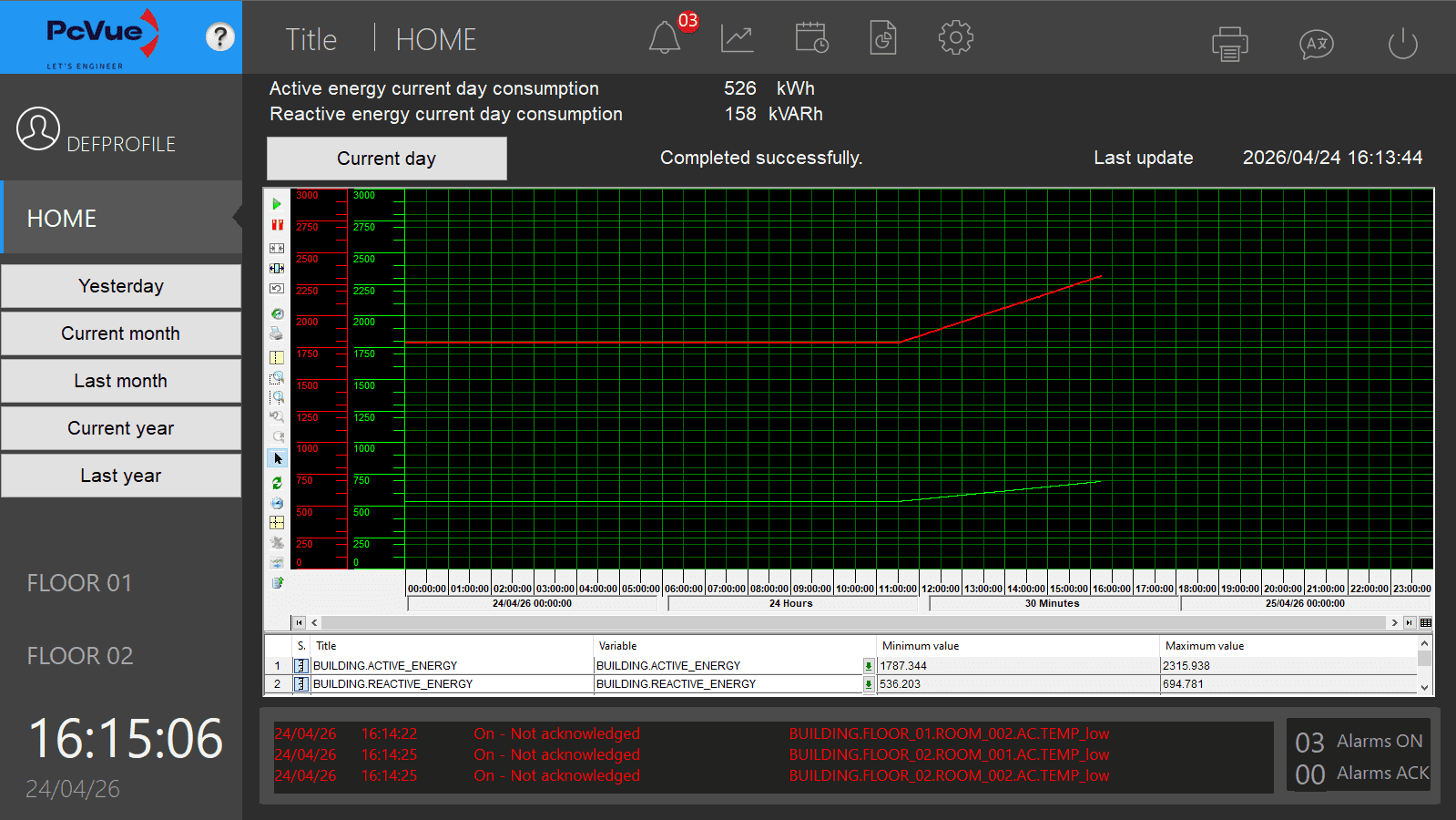
The COUNTER statistical flag (value 128) is used so that Export_Trend returns the difference between the last and first recorded values within the requested period, automatically handling meter rollover. Here below is the home mimic of the sample project with current day consumption display:
Scheduling
Counters are refreshed by two complementary mechanisms declared in Sub Main():
Cyclic triggers — current-period counters
Prime-spaced intervals are used to prevent simultaneous execution of the three cyclic jobs:
| Period | Interval (s) | Sub-routine | Target branch |
|---|---|---|---|
| Current day | 127 | Export_CurrentDayCounters | BUILDING.CONSUMPTION.CURRENTDAY |
| Current month | 131 | Export_CurrentMonthCounters | BUILDING.CONSUMPTION.CURRENTMONTH |
| Current year | 137 | Export_CurrentYearCounters | BUILDING.CONSUMPTION.CURRENTYEAR |
Crontab triggers — closed-period counters
These fire once per period boundary to capture the definitive counter value:
| Period | Schedule | Sub-routine | Target branch |
|---|---|---|---|
| Last day | Every day at 00:01 | Export_LastDayCounters | BUILDING.CONSUMPTION.LASTDAY |
| Last month | 1st of month at 00:02 | Export_LastMonthCounters | BUILDING.CONSUMPTION.LASTMONTH |
| Last year | 1st of month at 00:03 | Export_LastYearCounters | BUILDING.CONSUMPTION.LASTYEAR |
Note on offsets: The one- to three-minute offsets ensure that archiving of the last timestamp has completed before the export is triggered.
Period-Timestamp Calculation
All timestamps are expressed in milliseconds since 01/01/1980, as required by Export_Trend.
| Period | Start | End |
|---|---|---|
| Current day | DateTimeValue(DAY, MONTH, YEAR, 0, 0, 0) | DateTimeValue() (now) |
| Last day | Yesterday at 00:00:00 | Yesterday at 23:59:59 |
| Current month | DateTimeValue(1, MONTH, YEAR, 0, 0, 0) | DateTimeValue() (now) |
| Last month | 1st of previous month at 00:00:00 | Last day of previous month at 23:59:59 |
| Current year | DateTimeValue(1, 1, YEAR, 0, 0, 0) | DateTimeValue() (now) |
| Last year | DateTimeValue(1, 1, YEAR-1, 0, 0, 0) | DateTimeValue(31, 12, YEAR-1, 23, 59, 59) |
Previous-month bounds are computed by GetPreviousMonthBounds: subtracting 1 ms from the first instant of the current month always lands on the last instant of the previous month, giving the correct day, month, and year without any calendar arithmetic.
Export Flow
Period sub-routine
      │
      └─► DoExport(dStart, dEnd, sPeriod)
               │
               ├── g_sPeriod = sPeriod          ← store branth tag for the callback
               ├── Event("ADDPROG", "@EXPORT.STATUS", …, sPeriod, "Get_Counters")
               ├── Export_Trend("GETSTATISTIC", …, COUNTER)
               └── CheckExportReturn(iResult)
                         │
              ┌──────────┘ (async – on @EXPORT.STATUS change)
              │
              └─► Get_Counters()
                       │
                       ├── status 0 / 4 / 5 → read buffer, write registers, DISPOSE
                       ├── status 1          → still running, do nothing
                       └── other             → log error, CANCEL + DISPOSE
The completion event (@EXPORT.STATUS) is registered before Export_Trend is called to avoid a race condition where the export completes synchronously before the event listener is armed.
Buffer Reading — Get_Counters
Export_Trend("READBUFFER", …) returns a block structured as:
Line 0  — variable names  (skipped)
Line 1  — descriptions    (skipped)
Line 2  — data row:  <Counter> ; <active_energy> ; <reactive_energy>
Seq_Buffer with "\n" separator iterates lines; with ";" separator it iterates fields within a line. The Counter column (field 0) is discarded; fields 1 and 2 are read as DOUBLE and rounded before formatting.
Output Formatting — FormatWithSpaces
Raw integer values are converted to strings and a space character is inserted every three digits from the right (e.g., 1254300 → "1 254 300"). This is done with a single forward pass:
- Convert the number to a string with
TOC(). - For each character at position
i(1-based), insert a space when(len − i) MOD 3 == 2andi > 1.
Values of three digits or fewer are returned unchanged.
Error Handling — CheckExportReturn
If Export_Trend returns a non-zero value immediately (synchronous error), CheckExportReturn prints a human-readable description of every documented error code (−1 through −30) and calls CANCEL + DISPOSE to release the internal request object.
Debug Mode
Set Const DEBUG = 1 at the top of the script to enable Print trace output in the SCADABasic log. Set back to 0 in production.
Required Configuration
| Item | Requirement |
|---|---|
| Trend recording | @BUILDING.ACTIVE_ENERGY and @BUILDING.REACTIVE_ENERGY must be configured for trend recording in PcVue. |
| Data Export licence | The Data Export module must be licensed in the PcVue protection key. Without it, Export_Trend runs in demonstration mode only. |
| Output variables | ACTIVE_ENERGY_TXT and REACTIVE_ENERGY_TXT must exist as text variables in the application. |
| Status register | @EXPORT.STATUS must exist as a register in the application. |
| Unit | The UnitName parameter is set to PROP_UNIT01; adjust to match your project’s unit name. |
Attached Files
Created on: 25 Apr 2026 Last update: 26 Apr 2026