What is a Library?
A library is the name given to the collection of folders in which PcVue keeps the files that define its mimics, mimic templates, symbols, images, and SCADA Basic programs. Whenever you open a mimic, paste a symbol, load a program etc. you can select the library where it is located.
There are two distinct library types, differentiated by their location within the PcVue folder structure.
- Local libraries - Located in the folder specific to a particular project and only available for that project.
- The Common library - A library located at the same level as the Bin folder and available to all projects.
- Shared libraries - Named libraries located in the LIB folder at the same level as the Bin folder and available to all projects.
About the local libraries
 Show picture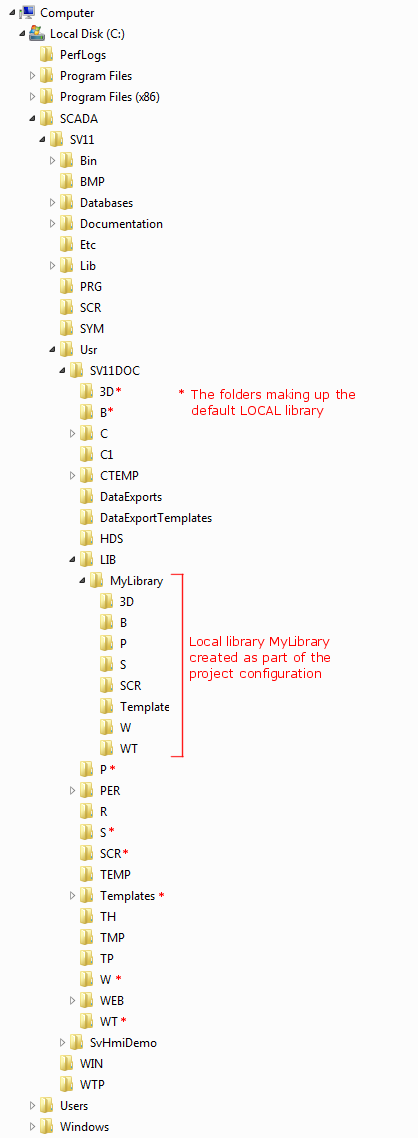
By default, there is a single local library for each project identified by the name LOCAL. This library cannot be deleted. When you are developing the HMI, if you do not change the library selection, everything is saved in this library. The library is located in the project root folder, and it is composed of the following folders.
| Folder | Contents |
| 3D | 3D mimics |
| B | Images |
| P | SCADA Basic programs |
| S | Symbols |
| SCR | VBA scripts |
| Templates | Application Architect templates and parameters |
| W | Windows (Mimics) |
| WT | Window templates (Mimic templates) |
Additional named local libraries, created using the Application Explorer as part of the project configuration, are located under the LIB folder that is located under the project root folder. There is one folder for each library that is created. Each folder contains the same eight sub-folders as described in the table above.
The name by which a library is identified is not necessarily the same as its folder name.
About the common library
By default, there is a common library accessible to all projects that is located in the Application data folder. This library cannot be deleted. It is composed of the following folders.
| Folder | Contents |
| BMP | Images |
| GIS | Persistent data retrieved from map control providers. Includes map tiles. |
| PKI | Built-in certificate store. |
| PRG | SCADA Basic programs |
| SCR | VBA scripts |
| SYM | Symbols |
| WIN | Windows (Mimics) |
| WTP | Window templates (Mimic templates) |
About the shared libraries
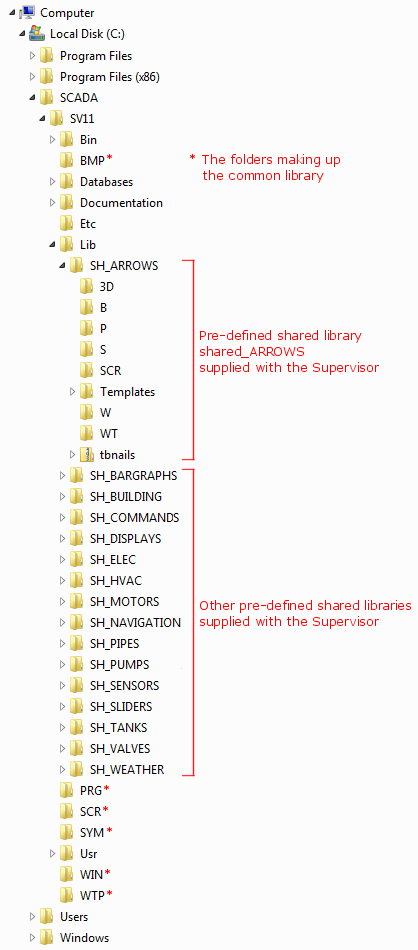
Shared libraries are in the Lib folder that is located in the Application data folder and are accessible to all projects. Each sub-folder contains a shared library. It is composed of the following folders.
| Folder | Contents |
| 3D | 3D mimics |
| B | Images |
| P | SCADA Basic programs |
| S | Symbols |
| SCR | VBA scripts |
| Templates | Application Architect templates and parameters |
| W | Windows (Mimics) |
| WT | Window templates (Mimic templates) |
If you chose the Typical setup when installing PcVue, several predefined libraries are installed with names such as shared_ARROWS, shared_MOTORS etc.
If you use the shared libraries in your project, and you copy the project to another location, make sure that you also copy the shared libraries you have used.
Changing the location of the shared library folders
You can change the location of the Application data folder using the Host Deployment Console or the svcmd CLI. It changes the location of the common library, shared library folders, and the projects root folder.
Managing the libraries
The libraries are managed using the Application Explorer. Using the Application Explorer, you can:
- Add new libraries.
- Remove libraries from the PcVue configuration and optionally delete the corresponding folders.
- Change a library's properties.
- Add images to a library.
- Delete individual mimics, mimic templates, symbols, programs, or images from a library.
See the Libraries topics in the Application Explorer help book for further information.