









The discovery of vulnerabilities in the PcVue client/server networking feature resulted in major fixes (see the security bulletin SB2025-4).
These fixes include the addition of security features to ensure the confidentiality and integrity of the messages exchanged between PcVue stations.
These security features are enabled by default only for new projects but not for migrated project (e.g. from version 16.2 to 16.3.4).
To apply them please follow the steps described below :
- Open the Application Explorer
- Go to the Networking feature
- Open the Settings dialog from the left panel
- In the Interoperability issues section uncheck the following options :
- Allow any node addresses
- Allow stations with altered security
- Save and deploy the modified project to all stations
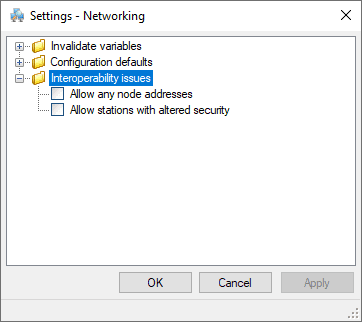
If these settings are not the same at each station, they can’t communicate with each other. This situation will persist until the stations are configured in the same way.
During this transient stage, the following warnings are logged and displayed in the event viewer :
2025/09/01,10:37:27.760,3,D,,3388,,11,Networking message version of station SERVER1 = 163000
2025/09/01,10:37:27.760,3,W,,3712,,11, Networking, the version ‘163000’ of the remote station ‘SERVER1’ is not compatible due to security constraints
2025/09/01,10:37:27.760,3,W,,3072,,11,Client->server connection CLIENT10C -> SERVER10S is aborted
…
2025/09/01,10:37:46.228,3,I,,3070,,11,Server->client connection CLIENT10S -> SERVER10C is OK
2025/09/01,10:37:46.230,3,W,,3716,,11,Networking, connection CLIENT10S -> SERVER10C is not secure, the remote node ‘DATASERVER10’ must not alter the security or the local node must allow it
2025/09/01,10:37:46.230,3,W,,3142,,11,Server->client connection CLIENT10S -> SERVER10C is rejected
We strongly recommend applying the security features as soon as possible to avoid exposing the SCADA system to the discovered vulnerabilities.
The ‘Allow stations with altered security‘ option has been implemented to disable the security feature when a migration is to be carried out in several stages over a period of time.
The ‘Allow any node addresses‘ option has been implemented to disable a whitelist filter controlling which IP addresses are authorised to connect to the station.
This whitelist is defined by the Networking configuration.
Please contact your technical support if you have any question regarding these security features.
Created on: 04 Mar 2026 Last update: 26 Mar 2026