









Principle
A WebVue client is a browser tab connected to the PcVue backend server. To force it to log out, the WEBVUE("HYPERLINK", ...) instruction must be executed in the context of that specific browser session, it cannot be triggered directly from an operator working on PcVue.
The sample project solves this by relaying an operator action through three variable scopes, until it reaches the right client:
- Shared scope – the operator’s action (button click) is visible to the whole system.
- Session context scope – each connected WebVue session evaluates the request and decides whether it is concerned.
- Client context scope – the targeted browser executes the actual disconnection.
Two use cases are covered:
- Closing one specific session, selected from a list of the currently connected clients.
- Closing all the WebVue sessions at once.
Displaying the list of connected clients
At project startup, the main function of the WebVue.SCB program is executed to initialize some variables and tell which function to launch when the user is selecting a row in the grid (AIgrid1):
Sub Main()
	sWindow = "Mimic 01";
	sBranch = "";
	Identity = "AIgrid1";
	Selector("SELPROG", sWindow, sBranch, Identity, "WebVue.SCB", "", "UpdateSessionToClose");
End Sub
The list itself is retrieved with the new LIST mode (syntax 6) of the WEBVUE instruction, which returns an XML fragment describing every active session:
Sub ListSyntax6()
	Webvue("LIST"); ' Retrieve the list of sessions
	iSessionCount = XMLPATH("COUNT", "webvue/list", "list/session");
	...
	For (i = 1; i <= iSessionCount; i++)
		sPath = FORMAT("list.session[%d].id", i);
		hBuff = XMLPATH("GET", "webvue/list", sPath);
		id = CGET_BUFFER(hBuff, 0, 255);
		...
	Next
End Sub
For each session, the id, creationtime, username and clienttype are extracted with XMLPATH and displayed in the grid. This program can be run once or on a cyclic basis (StartRefreshList / StopRefreshList) to keep the list up to date.
Selecting a row in the grid stores the corresponding session id in a shared variable:
Sub UpdateSessionToClose()
	@WEBVUE.IdToClose = DVAL(Selector("GETCELL", sWindow, sBranch, Identity, Selector("SELECTLINE", sWindow, sBranch, Identity), 0));
End Sub
The WEBVUE branch variables
All the variables used to relay the close request are grouped in a dedicated branch, WEBVUE. Their scope and role are documented directly in their description field:
| Variable | Type | Description (scope / usage) |
|---|---|---|
WEBVUE.IdToClose | Integer | Scope Shared (set by a Scada Basic) – id of the session selected in the grid |
WEBVUE.CloseMain | Command | Scope Shared (set by an animation) – “close this session” button |
WEBVUE.CloseAllMain | Command | Scope Shared (set by an animation) – “close all sessions” button |
WEBVUE.CloseSession | Bit | Scope Session context (updated by expression) – mirrors CloseMain in every session context |
WEBVUE.CloseAllSessions | Bit | Scope Session context (updated by expression) – mirrors CloseAllMain in every session context |
WEBVUE.CloseClientContext | Command | Scope Session context (set by a Scada Basic) – tells the targeted session to act |
WEBVUE.OpenMimic | Command | Scope Client context (updated by expression) – tells the targeted browser to act |
Two “on variable” expressions bridge the Shared scope to the Session context scope, so that the click on a button is instantly visible to every connected session:
EXPRESSIONONVAR,"CloseWebVueSession",...,"WEBVUE.CloseSession","","@WEBVUE.CloseMain"
EXPRESSIONONVAR,"CloseAllSessions",...,"WEBVUE.CloseAllSessions","","@WEBVUE.CloseAllMain"
EXPRESSIONONVAR,"OpenMimicOnWebVue",...,"WEBVUE.OpenMimic","","@WEBVUE.CloseClientContext"
A last expression bridges the Session context scope to the Client context scope (WEBVUE.OpenMimic from @WEBVUE.CloseClientContext), so that the request finally reaches the individual browser tab.
The WebVue.SCB program – reacting in each context
At logon, every WebVue session dynamically registers three programs to react to the variables above:
Sub CreateDynamicEvent()
	Event("ADDPROG", "@WEBVUE.CloseSession", "ALL>1", "WebVue.SCB", "", "CloseWebVueSession");
	Event("ADDPROG", "@WEBVUE.CloseAllSessions", "ALL>1", "WebVue.SCB", "", "CloseAllWebVueSession");
	Event("ADDPROG", "@WEBVUE.OpenMimic", "ALL>1", "WebVue.SCB", "", "OpenMimic");
End Sub
- Closing one session – when
CloseSessionbecomes 1 in a given session context, that session compares its own id (GetArg("WEB")) with the id selected by the operator (@WEBVUE.IdToClose). Only the matching session switchesCloseClientContextto 1:
Sub CloseWebVueSession()
	If (TOLL(GetArg("WEB")) == TOLL(@WEBVUE.IdToClose)) Then
		@WEBVUE.CloseClientContext = 1;
	End If
End Sub
- Closing all sessions – every WebVue session unconditionally switches
CloseClientContextto 1:
Sub CloseAllWebVueSession()
	If (GetArg("WEB") != 0) Then
		@WEBVUE.CloseClientContext = 1;
	End If
End Sub
- Reaching the browser – setting
CloseClientContexttriggers, through the expression above,WEBVUE.OpenMimicin the client context. This opens a dedicated mimic in that browser tab, so that the following instruction is finally executed by the targeted browser itself:
Sub OpenMimic()
	Window("OPEN", "CloseWebVue", ""); ' Opens a mimic to execute the Hyperlink mode of WEBVUE in the client context
End Sub

Sub CloseSession()
	WEBVUE("HYPERLINK", "WebClient/Authentication/Logout?useraction=true");
End Sub
The CloseSession sub above runs when mimic “CloseWebVue” opens, and performs the actual logout of that browser.
Note: The same
WEBVUE("HYPERLINK", ...)instruction can also be used to redirect a client to any URL, or to force it to reload the web client:
- Redirect:
WEBVUE("HYPERLINK", "https://your-web-site")- Reload (F5):
WEBVUE("HYPERLINK", "WebClient")- Logout:
WEBVUE("HYPERLINK", "WebClient/Authentication/Logout?useraction=true")
Profile configuration
The CreateDynamicEvent sub must be executed by every WebVue session as soon as it logs on, so that the dynamic events described above are registered in its own context. This is configured on the WebVue user profile (p_WebVue): the “Execute Scada Basic script at logon” property is set to call WebVue.SCB / CreateDynamicEvent.
Usage
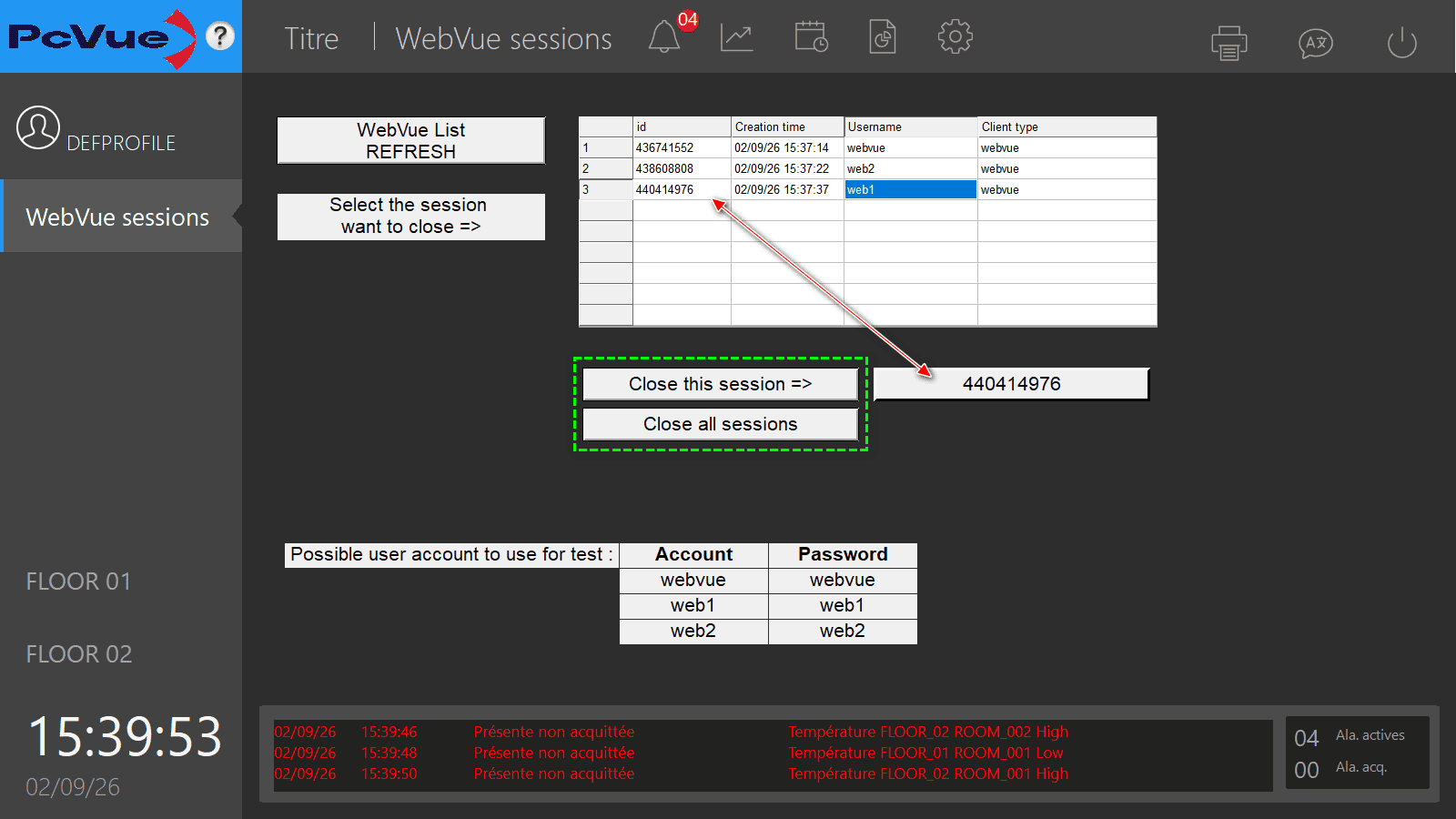
- Open “Mimic 01”: the grid displays the currently connected WebVue sessions (id, creation time, username, client type).
- Select the row corresponding to the session to disconnect: this stores its id in
@WEBVUE.IdToClose. - Press the “Close this session” button (sets
@WEBVUE.CloseMain) to disconnect only the selected session, or press “Close all sessions” (sets@WEBVUE.CloseAllMain) to disconnect every connected WebVue client.
Sample project: See the attached PcVue project WebVueCloseSession.
Created on: 02 Sep 2026