


more quick actions
minimize quick actions






Topic
[KB1248]Data Export : How to display millisecond in timestamp in an export file

Applies to:
PcVue 12 onwards
Summary:
The goal of this article is to show how to display milliseconds in timestamp in an export file
Details:
By default, the exported file does not display sample timestamp with milliseconds, even though export sampling is done in milliseconds.
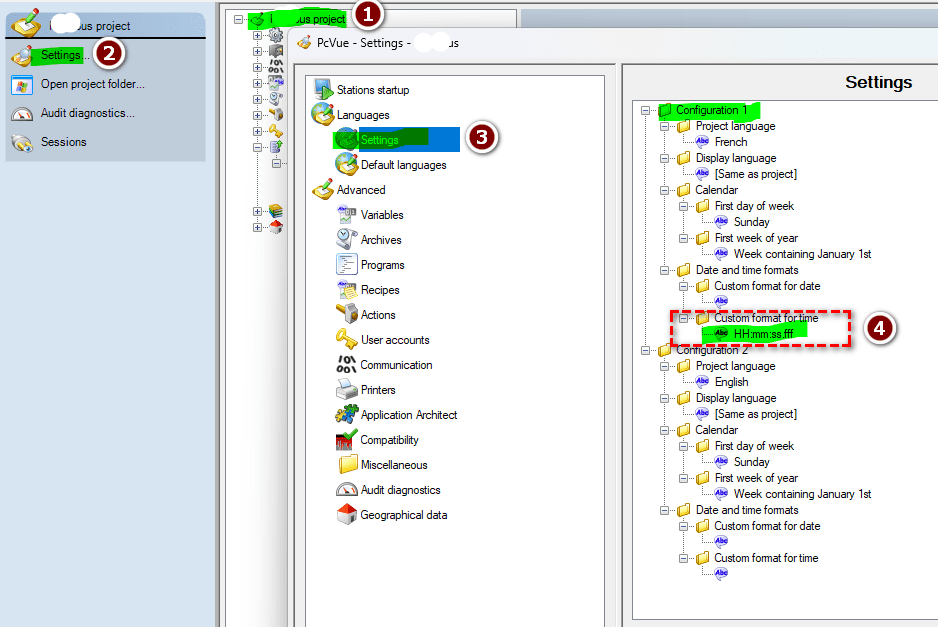
To display milliseconds, you generally need to change the date format of the language configured in Data Export.
The default time format is: HH :mm :ss (even if nothing is selected).
You therefore need to modify the time format of the language configured for export as follows:
HH :mm :ss .fff
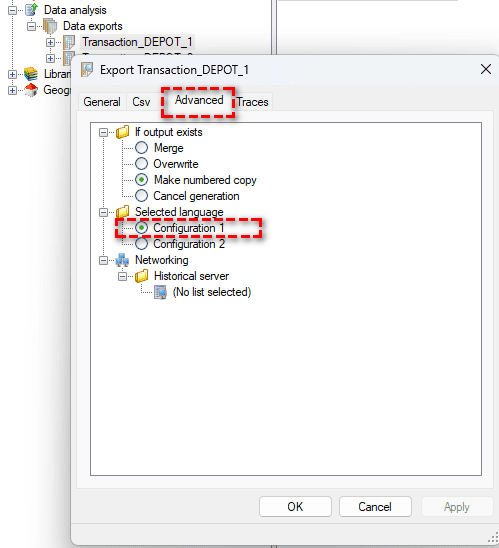
In this example, the language is set to configuration 1:
Useful links:
https://www.pcvue.com/ProductHelp/PcVue/fr/Content/AE/Project/Languages_settings.php
https://www.pcvue.com/ProductHelp/PcVue/fr/Content/AE/DataExport/Advanced.php
Created on: 22 Jul 2025