








Topic
[KB1273]Startup and connectivity failures after migrating a project to 17.0.0

On a project migrated from 15.2 or 16.3 to 17.0.0, one or more of the following are observed:
– The project does not start, or starts with part of its services unavailable.
– Stations no longer connect to each other (client/server, redundancy).
– Communication protocols that were operational before the migration are blocked.
– Security options that were enabled in the source project are refused or reset to their default value.
A project created natively in 17.0.0 is not affected.
Workaround
Apply this procedure to any project migrated from 15.2 or 16.3 to 17.0.0 that shows one of the symptoms listed above.
- Open the migrated project Application Explorer.
- Connect to a user with administration rights.
- Add to the current user profile the “Security Administration” right.
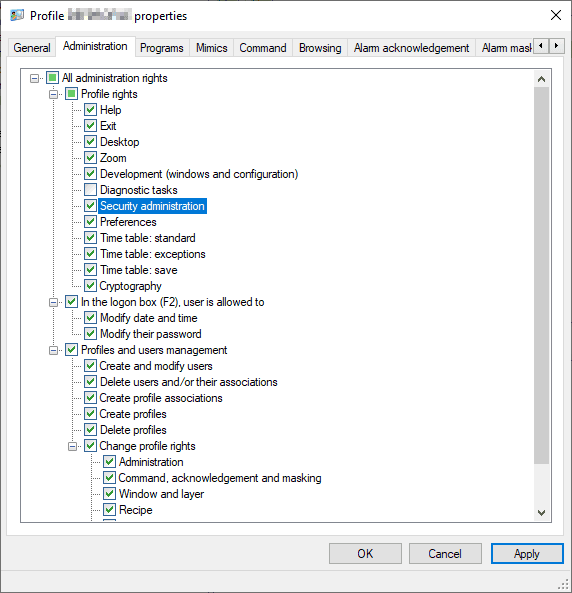
- Select the Security node.
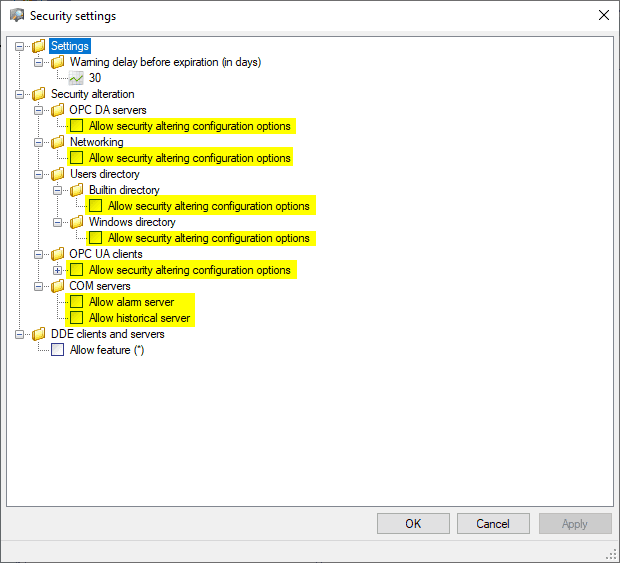
- Run the Settings action.
- Allow security alterations for the areas concerned by the observed symptom.
- Save the project, then close it.
- Reopen the project and test the behavior again.
The procedure applies to migrated projects only. On a project created natively in 17.0.0, strict defaults are normal and must not be relaxed for this reason. This procedure restores the behavior expected after a migration; it does not apply any hardening beyond what the source project was already running with, and the alterations can be locked again at any time.
Resolution
The behavior is corrected in 17.0.1. Once that version is installed, a project migrated from 15.2 or 16.3 keeps the security configuration of its source project and the workaround is no longer required.
Related articles
Created on: 20 Jul 2026 Last update: 09 Sep 2026