Backing up and restoring projects and libraries
This topic is not a complete guide to backup and restore best practices. It includes the minimum precautions you should take, as a User, to avoid losing any components necessary to run your project.
Having a backup process in place and making sure that the backups are complete and useable to restore your application, is an essential part of development.
Backing up the project configuration
The contents that a backup of a PcVue's project must contain as a minimum is:
- The project folder itself
- Any shared or common libraries that are in use
- The key file and the passphrase used to protect the project
In addition, your application may require third-party applications, tooling and files specific to your system set-up that are out of scope of this product documentation.
Your protected project is as secure as the secret key and passphrase used to protect it.
The key file and associated passphrase must be backed up and kept safe for later use.
You will need them to deploy the project on other hosts, you will need them if a host must be restored, and they are necessary for key renewal operations.
If they are compromised, your sensitive data are at risk.
If they are lost, you will end up losing access to your configuration data once the last host knowing the key will fail or will be decommissioned.
If you manage several projects, we recommend you use a different secure key and passphrase for each project.
The use of Central project management can help you manage the backup of your projects. See the topic How to manage project and library versions.
See also the important note about libraries in the topic Maintaining PcVue or the web deployment tools in the Installation book.
How to backup a project configuration
Each project is contained within a folder with the same name as the project in the application data folder, by default  Show picture
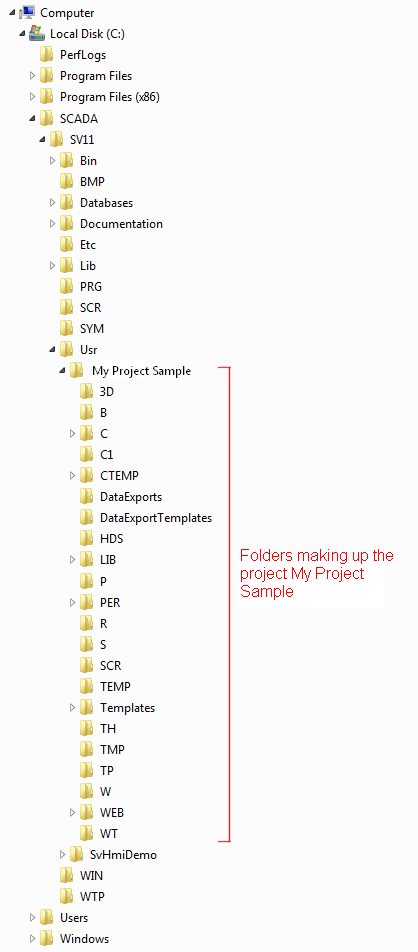
The application data folder can be verified and changed using the Host Deployment Console or the svcmd CLI.
To backup a project, use a compression tool to save the project contents as a single file.
If the project contains any additional local libraries these are included in the project folder structure.
How to backup shared and common libraries
Shared libraries are contained in the folder LIB located in the application data folder.
Common libraries are the folders Bmp, Prg, Scr, Sym, Win and Wtp at the root of the Application data folder.
- To backup a shared library and common libraries, use a compression tool to save the library and its contents as a single file.
How to restore a project from a backup
- Decompress the project backup file into the \usr folder located in the application data folder.
How to restore shared and common libraries from a backup
- Decompress the LIB folder backup to a temporary location.
- Replace (not merge) the installed LIB folder with the LIB folder you have just decompressed.
- Do the same with the common libraries
How to use both the shared libraries supplied with the current version of PcVue and libraries from a backup
- Decompress the LIB folder backup to a temporary location.
- Copy the folders of each library that you need to the LIB folder of the current version.
- Use the Library Manager in PcVue to add each of the libraries you have imported from the backup to the project. See the topic How to add an existing library in the Application Explorer.Libraries book.
Other sets of data to backup
For disaster recovery purposes, and in addition to the software installation package, project configuration, and libraries, you will want to have backup and restore procedures in place for:
- The key file and associated passphrase used to protect the project
- Files and folders stored in the Central folder used for central project management
- Databases if you are using the HDS or ODBC for data archiving
- The TH folder and its backup folder for proprietary archives
- The PER folder of your project - PER is used to store persistent data, files in \PER are changed regularly to persist variable, alarm and extended attribute values in particular. You want to have a procedure in place to take a snapshot of those files on a regular basis and be able to restore them in their last known good state if necessary.
- The TP folder of your project - TP is used to store files specific to your project, data files you handle by script for example. Depending on your project design, you may want to have a procedure in place to take a snapshot of those files on a regular basis and be able to restore them in their last known good state if necessary.