








Topic
[KB1279]How to record client station logon and logoff on the historical server?

In a multi-station architecture with a client-server archive unit, depending on the project configuration, the logon and logoff performed on client stations may not be recorded on the historical server.
To have them recorded, check that both settings below are applied, then restart the project on all stations.
1. Allow the historical server to record the actions of all stations
This option is not selected by default in a new project.
- Open the project settings, then Advanced > Compatibility.
- Under Archives > Proprietary, free and ODBC log lists recording, select Record all variables and actions (Execute program and Logon/logoff) from any stations.
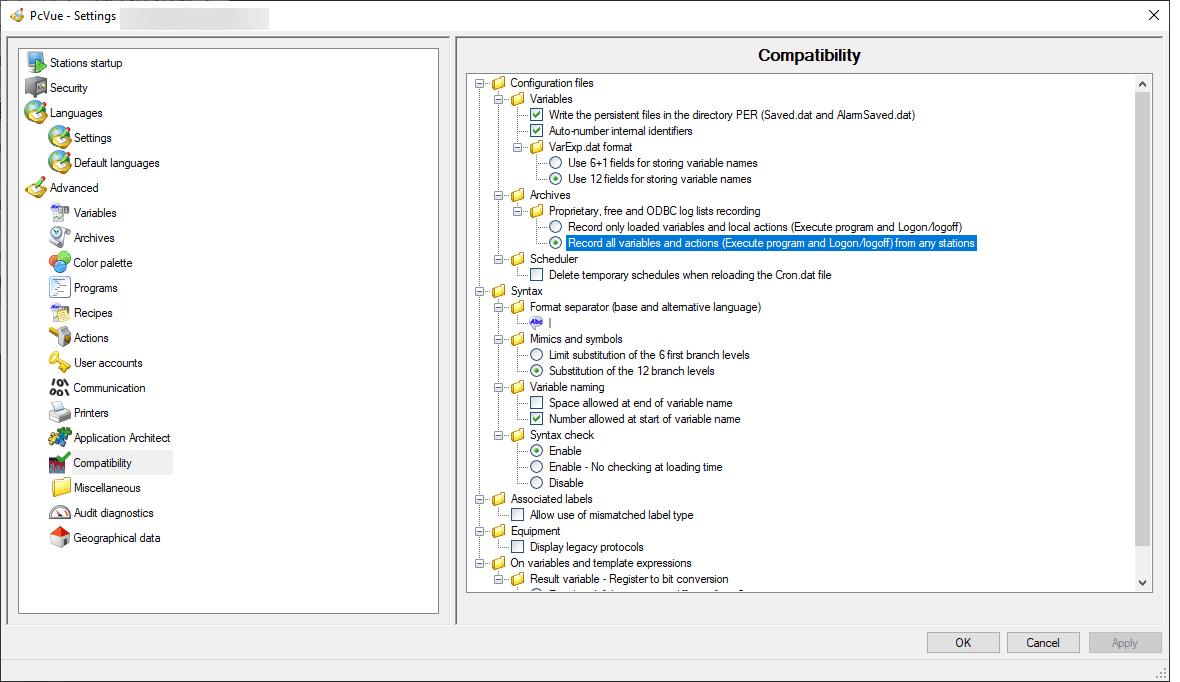
On its own, this option only allows the historical server to record the actions it receives from other stations. Step 2 is what makes the server receive them.
2. Declare the historical server as a client of each client station
- In the network configuration, open the properties of the historical server node.
- In the Links tab, under Select servers node, check the node of every client station whose logon/logoff must be recorded.
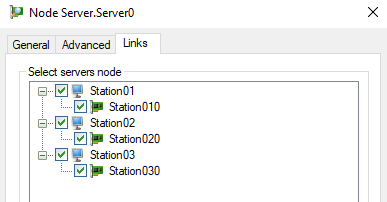
To check the result, log on and log off on a client station, then open the Log Viewer on the historical server: the events now appear with the name of the client station.
Good to know
- Any client station added to the project later must also be checked in the Links tab of the historical server node, otherwise its logon/logoff will not be recorded.
- Adding these links has no noticeable impact on performance. The historical server only subscribes to the log flow and system variables of each client station. If a client station is stopped, the server logs connection-lost messages for it, without impact on its own operation.
- The other actions that a non-historical station can log (send program, alarm acknowledgement, alarm mask, forcing of a variable unknown to the historical server) follow the same path and require the same configuration. See KB613: Compatibility issue with Client-Server Archiving.
- To configure the archive unit lists themselves, see Configuring client-server archive units in the product help.
Created on: 15 Oct 2026 Last update: 16 Oct 2026